Connecting two offices over the Internet sounds simple until you consider what happens to the traffic between them. The Internet is an untrusted network, so sending private business traffic directly across it is not something most organizations would want to do.
This is where a Site-to-Site IPsec VPN comes in.
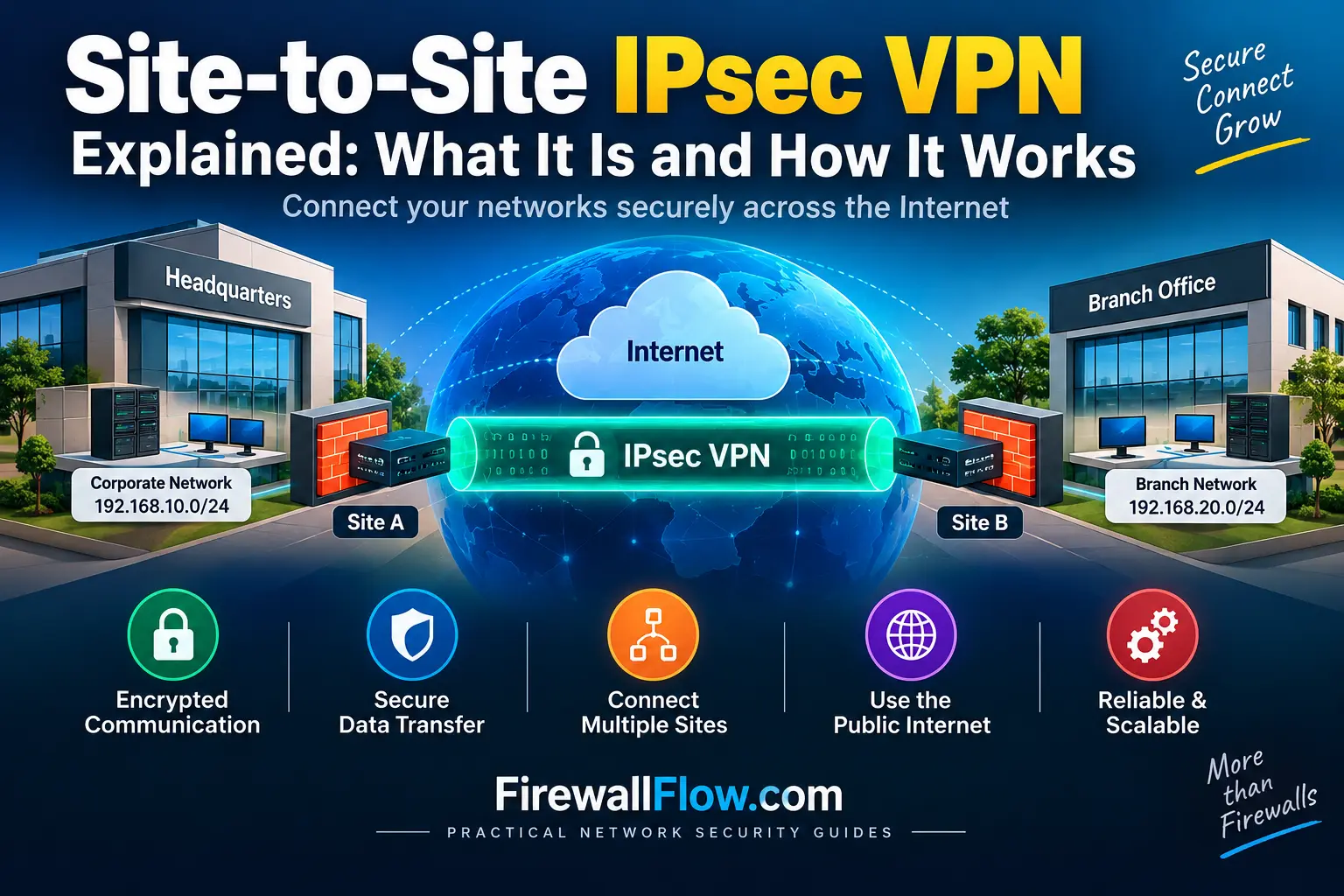
A site-to-site VPN creates a secure connection between two networks and uses IPsec to protect traffic as it travels across the Internet. Once the VPN is configured, users at one location can access resources at another location without having to manually start a VPN client.
In this article, we will build the basic understanding of how a site-to-site IPsec VPN works. We will use the same topology throughout this series, and in the final article, we will configure this exact scenario on two Palo Alto firewalls.
What Is a Site-to-Site VPN?
A site-to-site VPN connects two networks rather than individual users.
Imagine a company has a headquarters and a branch office. The headquarters has servers and applications that branch users need to access.
Instead of exposing those applications directly to the Internet, the company can establish a VPN between the two firewalls.
The basic design looks like this:
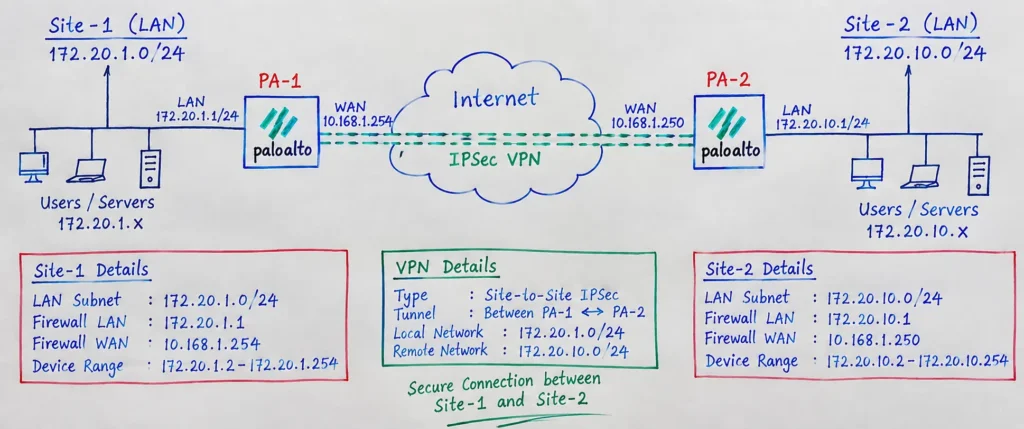
The firewalls become the VPN endpoints. They encrypt traffic before sending it across the Internet and decrypt it when it reaches the other side.
From the user’s perspective, the remote network can behave much like another reachable network within the organization.
Our IPsec VPN Lab Topology
To keep the concepts practical, we will use the following topology throughout this article series.
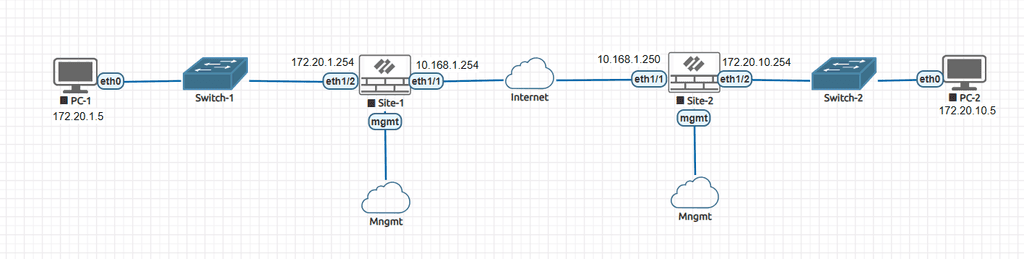
Our lab contains two Palo Alto firewalls:
- Site-1 represents the first location.
- Site-2 represents the second location.
- PC-1 is located behind Site-1.
- PC-2 is located behind Site-2.
The important addresses are:
| Device | Interface/Role | IP Address |
|---|---|---|
| PC-1 | Site-1 LAN | 172.20.1.5 |
| Site-1 Firewall | LAN | 172.20.1.254 |
| Site-1 Firewall | WAN | 10.168.1.254 |
| Site-2 Firewall | WAN | 10.168.1.250 |
| Site-2 Firewall | LAN | 172.20.10.254 |
| PC-2 | Site-2 LAN | 172.20.10.5 |
The 10.168.1.0/24 network represents the Internet/WAN segment in our lab.
Our eventual goal is simple:
PC-1
172.20.1.5
     |
     ↓
Site-1 Firewall
     |
     ↓
   IPsec
   VPN
     ↓
Site-2 Firewall
     |
     ↓
PC-2
172.20.10.5
PC-1 should be able to communicate with PC-2 through the encrypted VPN tunnel.
Why Do We Need IPsec?
The Internet was not designed to provide private communication between two organizations.
If a packet travels from one private network to another through the Internet, the organization needs a way to protect that traffic.
IPsec, or Internet Protocol Security, provides the mechanisms required to protect IP traffic. The NIST Guide to IPsec VPNs provides detailed guidance on how IPsec and IKE can be used to protect communications across IP networks.
Depending on the configuration, IPsec can provide:
- Encryption
- Data integrity
- Peer authentication
- Protection against replay attacks
The important point is that IPsec protects the traffic while it is traveling through the untrusted network.
For example, PC-1 might send:
172.20.1.5 → 172.20.10.5The original private packet is protected by IPsec before it crosses the Internet.
The remote firewall receives the protected traffic, processes it, and forwards the original traffic toward PC-2.
How Does a Site-to-Site IPsec VPN Work?
There are several steps involved in establishing and using an IPsec VPN.
At a high level:
VPN Peer Reachability
        ↓
IKE Negotiation
        ↓
Peer Authentication
        ↓
IPsec Negotiation
        ↓
VPN Tunnel Established
        ↓
User Traffic Matches VPN
        ↓
Traffic Encrypted
        ↓
Internet
        ↓
Traffic Decrypted
        ↓
Remote Network
The first part of the process involves the two firewalls establishing a secure relationship.
They negotiate security parameters and authenticate each other.
After that, the firewalls establish the security parameters required to protect the actual data traffic.
These stages are commonly referred to as IKE Phase 1 and Phase 2.
We will cover both in detail in the next two articles in this series.
What Happens to the Traffic?
Let’s take the actual lab example.
PC-1 has the address:
172.20.1.5PC-2 has the address:
172.20.10.5When PC-1 sends traffic to PC-2, the packet initially looks like:
Source:      172.20.1.5
Destination: 172.20.10.5
The packet reaches the Site-1 firewall.
The firewall determines that 172.20.10.0/24 is a remote network reachable through the VPN.
The traffic is then protected by IPsec and sent toward the Site-2 firewall.
Conceptually:
PC-1
172.20.1.5
    |
    ↓
Site-1 Firewall
    |
    ↓
[ Encrypted IPsec Traffic ]
    |
    ↓
   Internet
    |
    ↓
Site-2 Firewall
    |
    ↓
PC-2
172.20.10.5
The Internet does not need to understand the private network communication. It only needs to deliver the protected traffic between the two VPN endpoints.
What Is IKE?
You will frequently see the term IKE when working with IPsec VPNs.
IKE stands for Internet Key Exchange.
Its job is to help the VPN peers establish a secure relationship and negotiate the parameters required for the VPN.
For example, the firewalls need to agree on things such as:
- Encryption algorithms
- Authentication methods
- Diffie-Hellman parameters
- Key lifetimes
- Other security settings
They also need to authenticate each other.
A common method is a pre-shared key (PSK).
Another option is certificate-based authentication, which is commonly used in larger enterprise environments.
We will explore IKE and the Phase 1 negotiation in the next article.
What Are IKE Phase 1 and Phase 2?
You do not need to understand every negotiation detail yet. The easiest way to think about them is:
Phase 1
Phase 1 establishes a secure relationship between the two VPN peers.
Site-1 Firewall
       ↕
   IKE Phase 1
       ↕
Site-2 Firewall
The firewalls authenticate each other and negotiate the initial security parameters.
Phase 2
Phase 2 establishes the security parameters used to protect the actual user traffic.
PC-1 → Site-1 → IPsec → Site-2 → PC-2Phase 2 also determines which traffic should be protected by the VPN.
We will examine these concepts separately in the following articles rather than mixing all the configuration details into one guide.
Which Traffic Goes Through the VPN?
A site-to-site VPN does not necessarily mean that all traffic from one site travels through the tunnel.
The firewalls need to know which traffic belongs to the VPN.
In our example, the VPN connects:
Site-1:
172.20.1.0/24

Site-2:
172.20.10.0/24
Therefore, traffic such as:
172.20.1.5 → 172.20.10.5should be associated with the VPN.
But traffic such as:
172.20.1.5 → Internetwould normally follow the normal Internet path instead of going through the site-to-site tunnel.
This is why routing and traffic selectors are important parts of an IPsec VPN design.
Site-to-Site VPN vs Remote Access VPN
These two VPN types serve different purposes.
A site-to-site VPN connects networks:
Office A
   |
Firewall
   |
 IPsec
   |
Firewall
   |
Office B
A remote access VPN connects an individual user or device:
Laptop
   |
VPN Client
   |
Internet
   |
Corporate Firewall
   |
Corporate Network
For example, if 50 users at a branch office need access to applications at headquarters, a site-to-site VPN is usually more practical than configuring 50 individual VPN clients.
Palo Alto Networks also supports route-based site-to-site VPNs, where routing determines whether traffic is sent through the VPN tunnel. You can learn more about the concept in the official Palo Alto Networks Site-to-Site VPN Overview official documentation.
Common Site-to-Site VPN Use Cases
Site-to-site IPsec VPNs are commonly used in enterprise networks for several purposes.
Branch Office Connectivity
A company can connect branch offices to headquarters so users can access centralized applications and services.
Data Center Connectivity
Two data centers can use an IPsec VPN to securely exchange traffic across different networks.
Cloud Connectivity
Organizations can connect an on-premises network to a cloud environment using an IPsec VPN.
Partner Connectivity
A controlled VPN connection can be established between organizations that need to exchange specific business traffic.
In each case, the same basic idea applies: securely connect two networks across an untrusted network.
Benefits of Site-to-Site IPsec VPN
One major advantage is that the VPN is generally transparent to end users.
Once the firewalls, routing, and security policies are configured correctly, users do not normally need to manually connect a VPN client.
Other benefits include:
- Encrypted communication
- Network-to-network connectivity
- Centralized security control
- Support for geographically separated locations
- Integration with enterprise firewalls
- Ability to restrict traffic using firewall policies
IPsec is also widely supported by network and security platforms, making it useful when connecting different environments.
Limitations and Challenges
IPsec VPNs are not completely maintenance-free.
The configuration involves several components, and a problem with any one of them can affect connectivity.
For example:
- Incorrect IKE parameters can prevent Phase 1 from establishing.
- Incorrect IPsec parameters can prevent Phase 2.
- Missing routes can prevent traffic from reaching the tunnel.
- NAT can change the source address unexpectedly.
- Security policies can block otherwise valid VPN traffic.
- Overlapping subnets can create routing problems.
This is why understanding how the individual components work is more useful than simply memorizing a configuration.
A Common Misconception: “VPN Up Means Everything Works”
This is one of the most common mistakes when troubleshooting IPsec VPNs.
You might see:
IKE:   UP
IPsec: UP
and assume that the VPN is completely operational.
But the actual traffic could still fail.
For example:
VPN Tunnel
    ↓
UP
    ↓
Routing problem
    ↓
Traffic fails
Or:
VPN Tunnel
    ↓
UP
    ↓
Security Policy
    ↓
Traffic denied
Or:
VPN Tunnel
    ↓
UP
    ↓
Incorrect NAT
    ↓
Traffic fails
A proper VPN verification therefore needs to check more than the tunnel status.
Security Best Practices
A site-to-site VPN should be designed with security in mind from the beginning.
Use modern, organization-approved cryptographic algorithms and avoid outdated algorithms unless they are required for legacy interoperability.
Use a strong and unique pre-shared key when PSK authentication is used.
More importantly, do not treat the VPN as a trusted connection where everything is automatically allowed.
Security policies should restrict communication between the connected networks based on the actual business requirement.
For example, if a branch only needs access to an application server, there may be no reason to allow unrestricted access to every system at headquarters.
Monitoring is also important. Production VPNs should be monitored for tunnel availability, negotiation failures, and unexpected traffic.
A Simple Way to Remember IPsec VPN
If you are preparing for a networking or network security interview, remember the overall flow like this:
IKE
  ↓
Authenticate Peers
  ↓
Establish Secure Relationship
  ↓
IPsec
  ↓
Protect Data Traffic
  ↓
Traffic Selectors
  ↓
Routing
  ↓
Security Policy
  ↓
Encrypted Communication
Each component has a different job.
Once you understand this flow, troubleshooting becomes much easier because you can identify which part of the process is failing.
What We Will Configure in the Next Articles
This article covered the basic concept of a site-to-site IPsec VPN.
In the next article, we will focus specifically on IKE Phase 1 and understand how two VPN peers authenticate each other and negotiate their initial security parameters.
After that, we will cover IPsec Phase 2, ESP, PFS, and traffic selectors.
We will then look at routing, tunnel interfaces, NAT, and security policies, which are critical for getting actual traffic through the VPN.
Finally, we will put everything together in a practical lab using the two Palo Alto firewalls shown in our topology.
The final goal is to make this traffic work:
PC-1
172.20.1.5
     |
     ↓
Palo Alto Site-1
10.168.1.254
     |
     |==== IPsec VPN ====|
     |
Palo Alto Site-2
10.168.1.250
     |
     ↓
PC-2
172.20.10.5
Frequently Asked Questions
What is a site-to-site IPsec VPN?
A site-to-site IPsec VPN securely connects two private networks through an untrusted network such as the Internet.
Does a site-to-site VPN require a VPN client?
No. The VPN is established between the network gateways, normally firewalls or routers. End users typically do not need a VPN client.
What is IPsec used for?
IPsec provides mechanisms for protecting IP traffic through encryption, integrity protection, authentication, and anti-replay protection.
What is IKE?
IKE, or Internet Key Exchange, is used to establish the security relationship between VPN peers and negotiate the parameters needed for the VPN.
What are Phase 1 and Phase 2?
Phase 1 is commonly used to describe the initial IKE negotiation and peer authentication. Phase 2 refers to the negotiation of the security parameters used to protect the actual data traffic.
Does all traffic go through a site-to-site VPN?
No. Normally, only traffic matching the VPN’s routing and traffic-selector configuration is sent through the tunnel. Internet-bound traffic can continue through the normal Internet path.
Why can a VPN be up but traffic still fail?
A VPN tunnel can be successfully established while routing, NAT, security policies, traffic selectors, or endpoint firewalls prevent the actual traffic from working.
Are site-to-site VPNs secure?
IPsec can provide strong protection when configured with appropriate cryptographic algorithms, secure authentication, proper key management, and restrictive security policies.
Conclusion
A site-to-site IPsec VPN provides a secure way to connect two private networks across an untrusted network.
The basic concept is straightforward: the VPN gateways establish a secure relationship, negotiate the parameters required to protect the traffic, and then encrypt traffic that belongs to the remote network.
But a working VPN depends on more than encryption alone. IKE, IPsec, traffic selectors, routing, NAT, and security policies all play different roles.
Understanding those roles is the foundation for configuring and troubleshooting IPsec VPNs in a real enterprise environment.
In the next article, we will take a closer look at IKE Phase 1, including peer authentication, encryption, Diffie-Hellman, pre-shared keys, IKEv1 vs IKEv2, and what actually happens when two VPN peers begin negotiating.
Next in the series:
IPsec VPN IKE Phase 1 Explained: Negotiation and Authentication

Cybersecurity blogger with a focus on firewalls, network security, and tech trends making security simple for everyone, from IT pros to curious minds.