Remote work has made SSL VPN access a standard part of most networks, and many organizations also rely on site-to-site VPN tunnels to connect with vendors, business partners, or hosted applications. On paper, everything seems straightforward. Office users can access the vendor’s application without any issues, but remote users connected through SonicWall NetExtender suddenly cannot.
I’ve run into this scenario more times than I can count. The application works perfectly inside the office, DNS appears to be configured correctly, and the site-to-site VPN is healthy. The missing piece is that the remote user’s traffic has to cross two separate VPNs, and each stage must be configured correctly. If even one component is missing, the connection fails.

Why This Is a Double-Hop VPN Problem
The first thing to understand is that this is not a normal SSL VPN connection.
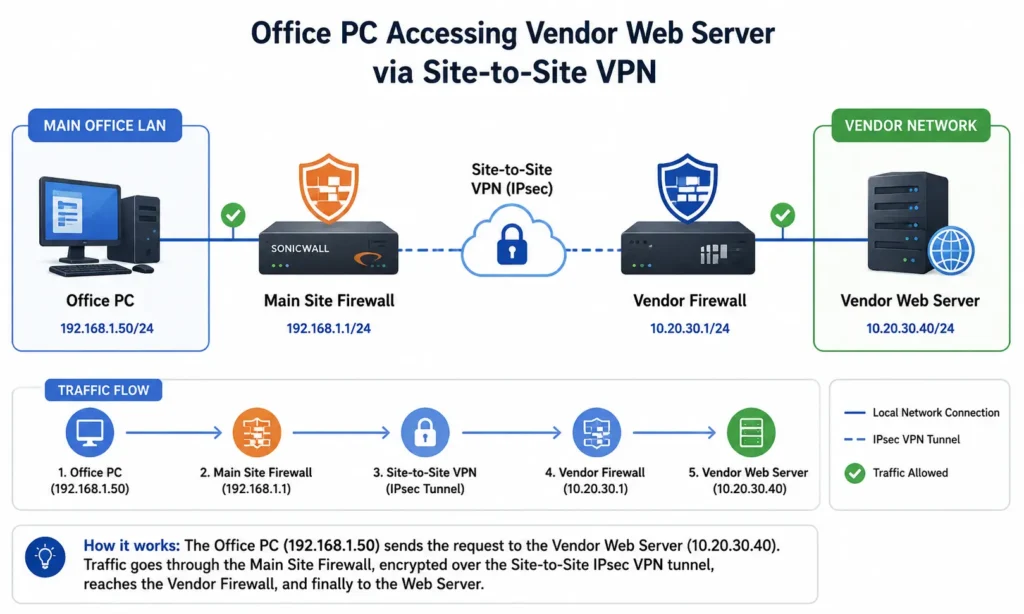
An office user reaches the vendor’s server using a single VPN path:
A remote user follows a completely different path:
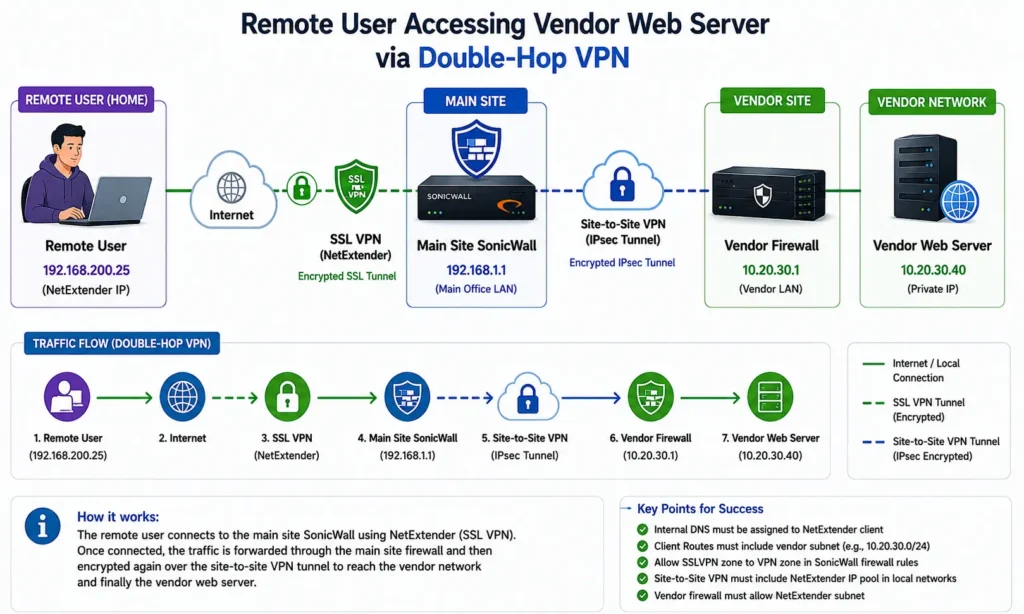
The user’s traffic first enters the corporate network through the SSL VPN, then immediately needs to exit through the site-to-site VPN toward the vendor. This creates what many engineers call a double-hop VPN.
The important thing to remember is that SonicWall treats the SSL VPN client as a separate network, not as if the user is physically sitting inside the office LAN. That distinction affects routing, firewall policies, and VPN encryption domains.
DNS Resolution, Make Sure NetExtender Uses the Internal DNS Server
In this scenario, the vendor’s web server has a private IP address and users access it by URL.
For example:
vendorapp.company.local
        │
        ▼
10.20.30.40
Your internal DNS server contains the required A record, so office users resolve the name without any issues.
Remote users must also query the same internal DNS server. If NetExtender leaves the user’s home router configured as the DNS server, the lookup will fail because the public internet has no knowledge of your internal DNS records.
On the SonicWall, this is configured under:
SSL VPN
→ Client Settings
→ DNS Server
Specify your internal DNS server so it is assigned to NetExtender clients when they connect.
Once connected, verify the client configuration by opening Command Prompt and running:
ipconfig /allLook for the NetExtender adapter and confirm that the DNS server matches your corporate DNS server.
Example:
Ethernet adapter SonicWall NetExtender
DNS Servers . . . . . : 192.168.1.10
If you instead see the user’s home router, such as 192.168.0.1 or 192.168.1.1, the URL will never resolve correctly.
Next, verify name resolution directly.
nslookup vendorapp.company.localA successful lookup should return the vendor’s private IP address.
If DNS fails here, there is no point troubleshooting firewall rules or VPN routing until DNS is corrected.
Client Routes, Make Sure the Vendor Network Is Pushed to NetExtender
This is where most people get stuck.
Even if DNS resolves successfully, Windows still needs to know where to send packets destined for the vendor’s subnet.
Suppose the vendor network is:
10.20.30.0/24When NetExtender connects, SonicWall pushes network routes to the VPN client. These routes tell Windows which destinations should travel through the VPN instead of the local internet connection.
On SonicWall, these routes are controlled by the user’s SSL VPN permissions.
Navigate to:
Users
→ Local Groups
→ SSLVPN Services
→ VPN Access
or review the VPN Access tab for the appropriate user or group.
Make sure the vendor network object is included in the allowed networks.
For example:
LAN Subnet
192.168.1.0/24
Vendor Network
10.20.30.0/24
If the vendor subnet is missing, Windows has no route for that destination. Even though DNS resolves correctly, packets are sent toward the user’s local internet gateway instead of through the SSL VPN.
You can confirm this by running:
route printor
tracert 10.20.30.40If the first hop is the user’s home router instead of the NetExtender adapter, the required client route is missing.
Firewall Access Rules, Allow SSLVPN Traffic to Reach the VPN Zone
Another common issue is firewall policy.
Most SonicWall deployments already include an access rule allowing:
SSLVPN Zone
        │
        ▼
LAN Zone
This allows remote users to reach internal servers.
However, traffic going to a site-to-site VPN does not terminate in the LAN zone.
Instead, it follows this path:
SSLVPN Zone
        │
        ▼
VPN Zone
If there is no rule allowing SSLVPN to VPN traffic, SonicWall drops the session before it ever reaches the tunnel.
Navigate to:
Rules and Policies
→ Access Rules
Select:
From Zone: SSLVPN
To Zone: VPN
If no appropriate allow rule exists, create one that permits the required traffic.
I’ve seen plenty of deployments where SSL VPN access to internal resources works perfectly, but access through the site-to-site tunnel fails simply because this rule was never added.
Site-to-Site Tunnel Proxy IDs and Network Objects
Even if DNS, routes, and firewall rules are all correct, one more issue often appears.
Most site-to-site VPNs define which local and remote networks are allowed to communicate. Depending on the VPN configuration, these are sometimes called local networks, remote networks, proxy IDs, or encryption domains.
Suppose your office LAN is:
192.168.1.0/24Your NetExtender clients receive addresses from:
192.168.200.0/24If the VPN policy only includes the office LAN:
Local Network
192.168.1.0/24
then traffic arriving from:
192.168.200.0/24does not match the VPN policy.
Some vendors silently discard this traffic, while others never send return traffic because the SSL VPN subnet is unknown to them.
The solution is to include the SSL VPN client pool within the VPN’s local network definition.
Depending on your SonicWall configuration, this may involve creating a network object group that contains both:
Office LAN
192.168.1.0/24

SSL VPN Pool
192.168.200.0/24
The vendor firewall must also allow this subnet as a valid source network. If the remote firewall is managed by another company, coordinate the change with their administrator.
This step is frequently overlooked because office users continue working normally, making it appear that the VPN itself is healthy.
Step-by-Step Troubleshooting Sequence
When troubleshooting this issue, work through the process in order instead of changing multiple settings at once.
First, verify the NetExtender configuration.
ipconfig /allConfirm:
- The NetExtender adapter is connected.
- The correct internal DNS server is assigned.
- The client has received an SSL VPN IP address.
Next, test DNS.
nslookup vendorapp.company.localIf the lookup fails, investigate the DNS configuration before moving forward.
If DNS succeeds, test network reachability.
ping 10.20.30.40Keep in mind that many organizations block ICMP, so a failed ping does not always indicate a routing problem.
Next, check the packet path.
tracert 10.20.30.40If traffic immediately goes to the home router, the vendor subnet is missing from the NetExtender client routes.
If traffic reaches the SonicWall but never reaches the vendor network, review:
- SSLVPN to VPN access rules
- VPN policy local and remote networks
- Vendor firewall configuration
Finally, test the application itself.
Open the URL in a browser or use:
curl https://vendorapp.company.localIf DNS works, routes are correct, and the application still times out, the issue is almost always within the firewall policies or the VPN encryption domains.
Quick Troubleshooting Checklist
- Verify NetExtender successfully connects.
- Confirm the NetExtender adapter receives the internal DNS server using
ipconfig /all. - Test DNS resolution using
nslookup. - Verify the vendor subnet is included in the user’s VPN Access permissions.
- Confirm the vendor subnet appears in the client’s routing table.
- Check for an allow rule from the SSLVPN zone to the VPN zone.
- Verify the SSL VPN client subnet is included in the site-to-site VPN local network or proxy IDs.
- Confirm the vendor firewall allows the SSL VPN client subnet.
- Test connectivity using
ping,tracert, and the application URL.
One final tip, when office users can access the application but remote users cannot, resist the urge to assume the site-to-site VPN is broken. In most cases, the tunnel itself is working exactly as expected. The real problem is that the SSL VPN client has not been fully integrated into the routing, firewall policies, or VPN encryption domains. Once those four areas, DNS, client routes, access rules, and VPN networks, are configured consistently, remote users can access vendor-hosted resources just as reliably as users sitting in the office.
🔗 Related Articles

Cybersecurity blogger with a focus on firewalls, network security, and tech trends making security simple for everyone, from IT pros to curious minds.