In the first article of this series, we looked at what a site-to-site IPsec VPN is, why organizations use it, and how traffic travels securely between two private networks.
Now we are going one level deeper.
Before two firewalls can establish an IPsec tunnel and securely exchange data, they first need to agree on how they will communicate securely and how they will authenticate each other. This is where IKE — Internet Key Exchange comes into the picture.
In a typical site-to-site VPN, IKE is responsible for negotiating the security parameters between the two VPN peers and establishing the security association needed before IPsec can protect user traffic.
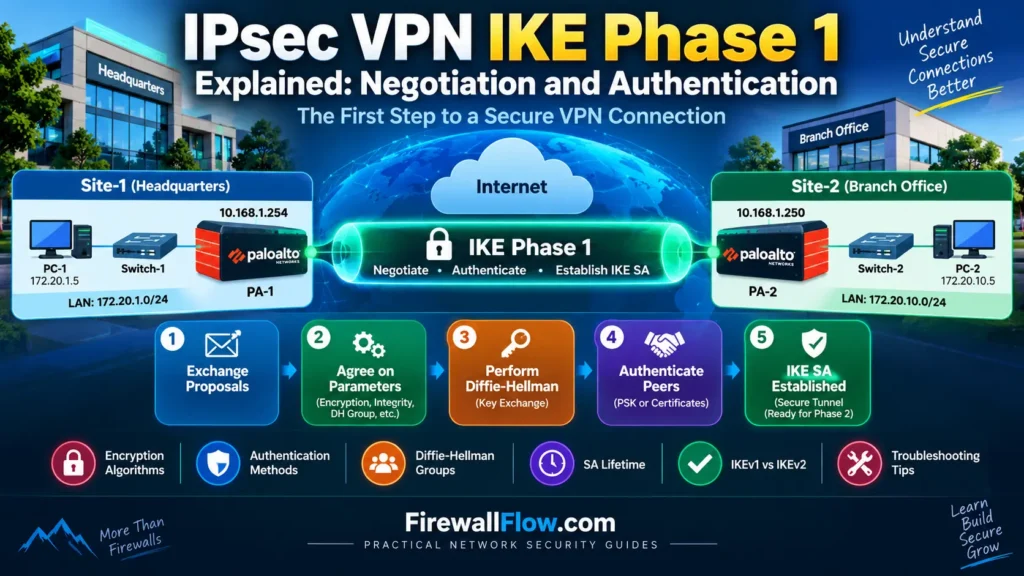
In this article, we will focus specifically on IKE Phase 1: what it does, what parameters are negotiated, how authentication works, what Diffie-Hellman contributes, and what happens when Phase 1 fails.
The explanations will continue using the same lab topology from Part 1, so you can follow the complete VPN process from the initial negotiation through the final IPsec tunnel.
Our Site-to-Site IPsec VPN Lab
We will continue using the same topology throughout this series.
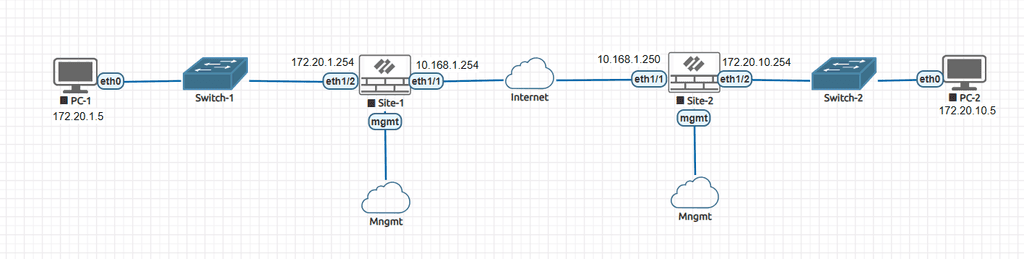
Our lab contains two Palo Alto firewalls connected through a simulated Internet/WAN network.
Site-1
- LAN:
172.20.1.0/24 - PC-1:
172.20.1.5 - Firewall LAN:
172.20.1.254 - Firewall WAN:
10.168.1.254
Site-2
- LAN:
172.20.10.0/24 - PC-2:
172.20.10.5 - Firewall LAN:
172.20.10.254 - Firewall WAN:
10.168.1.250
The objective is eventually to allow:
172.20.1.0/24 ↔ 172.20.10.0/24
to communicate securely through an IPsec VPN.
The 10.168.1.0/24 network represents the simulated Internet/WAN segment in our lab. It is not being used as real public Internet addressing.
What Is IKE?
IKE (Internet Key Exchange) is the protocol used by IPsec peers to establish and manage the security relationship between them. NIST provides detailed guidance on implementing IPsec and IKE in its NIST Guide to IPsec VPNs.
Think about what happens if two firewalls want to create a secure VPN.
They cannot simply start encrypting traffic randomly. They need to agree on several things first:
- Which encryption algorithm should be used?
- Which integrity/authentication algorithm should be used?
- Which Diffie-Hellman group should be used?
- How will the VPN peers authenticate each other?
- How long should the negotiated security association remain valid?
IKE handles this negotiation.
A simplified way to think about the process is:
IKE negotiates the security → peers authenticate → keys are established → IPsec can protect traffic
This is why IKE is such an important part of an IPsec VPN.
Where Does IKE Phase 1 Fit Into IPsec?
A site-to-site VPN involves several different stages.
At a high level:
VPN Peer 1
    |
    |  IKE negotiation
    ↓
IKE Phase 1
    |
    |  Secure management/authentication relationship
    ↓
IKE Phase 2
    |
    |  IPsec security parameters
    ↓
IPsec Tunnel
    |
    |  Encrypted user traffic
    ↓
VPN Peer 2
For traditional terminology, we commonly refer to these as Phase 1 and Phase 2.
There is an important detail here.
With IKEv2, the terminology is more formally based on the IKE SA and Child SA, rather than the exact Phase 1/Phase 2 terminology used with IKEv1. However, network engineers and firewall platforms still commonly use “Phase 1” and “Phase 2” when discussing VPN configuration and troubleshooting.
For this article, we will use Phase 1 because it makes the overall VPN workflow easier to understand.
What Does IKE Phase 1 Actually Do?
The main purpose of IKE Phase 1 is to establish a secure and authenticated relationship between the two VPN peers.
During this process, the firewalls negotiate security parameters and authenticate each other.
For our lab, imagine that:
PA-1                          PA-2
10.168.1.254       ↔        10.168.1.250
PA-1 wants to establish a VPN with PA-2.
Before encrypted application traffic can travel between:
172.20.1.0/24
        ↕
172.20.10.0/24
the two firewalls first need to establish trust and create the cryptographic material required for the VPN.
This is what IKE Phase 1 is helping them accomplish.
The Main Components Negotiated During IKE Phase 1
When configuring an IKE gateway, you normally encounter several important parameters.
The most important ones are:
- IKE version
- Encryption algorithm
- Authentication/integrity algorithm
- Diffie-Hellman group
- Authentication method
- Pre-shared key or certificate
- SA lifetime
Both VPN peers need compatible settings.
For example:
| Parameter | PA-1 | PA-2 |
|---|---|---|
| IKE Version | IKEv2 | IKEv2 |
| Encryption | AES | AES |
| Authentication/Integrity | Compatible | Compatible |
| DH Group | Compatible | Compatible |
| Authentication | PSK | PSK |
| Peer | 10.168.1.250 | 10.168.1.254 |
The exact algorithms and values will depend on your security requirements and firewall configuration.
IKE Encryption
One of the first things the VPN peers need to agree on is how the IKE communication itself will be protected.
Common encryption algorithms include:
- AES-128
- AES-192
- AES-256
AES-256 is often selected when stronger encryption is required, although the strongest available algorithm is not automatically the best choice in every environment. Compatibility, performance, platform support, and organizational security standards also matter.
For example:
PA-1 → AES-256
PA-2 → AES-256
If one side only proposes an algorithm that the other side does not accept, negotiation can fail.
This is one of the first things I check when troubleshooting an IKE negotiation problem.
IKE Authentication and Integrity
Encryption protects the confidentiality of information, but the peers also need a mechanism to verify that the negotiated messages have not been modified.
Depending on the IKE version and configuration, this can involve algorithms such as:
- SHA-256
- SHA-384
- SHA-512
Older environments may still contain SHA-1 configurations, but for new deployments, organizations generally prefer modern cryptographic algorithms according to their security standards and vendor support.
The important point is that both peers need compatible proposals.
For example:
PA-1 → AES-256 + SHA-256
PA-2 → AES-256 + SHA-256
The two sides can then agree on a compatible security proposal.
What Is Diffie-Hellman?
Diffie-Hellman (DH) is one of the concepts that often causes confusion when learning IPsec VPNs.
DH is not simply an encryption algorithm.
Its purpose is to allow two parties to establish shared secret material over an untrusted network without directly sending the final shared secret across that network.
For example:
PA-1                              PA-2
 |                                  |
 | ---- DH information ----------> |
 | <--- DH information ----------- |
 |                                  |
 |       Shared secret             |
 |       derived locally            |
The actual secret is not simply transmitted across the Internet.
Instead, both sides use the exchanged information and their private values to independently derive shared secret material.
This is particularly important because the VPN peers may be communicating across an untrusted network.
What Is a DH Group?
Diffie-Hellman comes in different groups that define the cryptographic parameters used for the key exchange.
Examples include:
- Group 14
- Group 19
- Group 20
- Group 24
Modern deployments should select an appropriate strong group supported by both peers and aligned with the organization’s security requirements.
The important troubleshooting point is simple:
PA-1: DH Group 14
PA-2: DH Group 19
If the peers do not have a compatible proposal, IKE negotiation may fail.
So when troubleshooting Phase 1, DH group compatibility is one of the parameters worth checking.
How Does Authentication Work?
Negotiating encryption and DH parameters is not enough.
The firewalls also need to establish that they are actually communicating with the expected VPN peer.
There are two common authentication approaches:
A pre-shared key (PSK) is a secret configured on both VPN peers.
For example:
PA-1: MyStrongVPNKey
PA-2: MyStrongVPNKey
The actual key should obviously be much stronger than this example.
PSKs are simple and commonly used for site-to-site VPNs, especially in smaller environments.
However, managing the same secret across a large number of VPN peers can become difficult.
Digital Certificates
Certificates provide another method of authenticating VPN peers.
Instead of relying on one shared secret, certificates and a trusted certificate authority infrastructure can be used.
This can be more appropriate for larger environments where many VPN connections need to be managed.
Let’s use our lab as an example.
Suppose PA-1 and PA-2 are configured with a PSK.
PA-1
WAN: 10.168.1.254
        |
        | IKE negotiation
        |
WAN: 10.168.1.250
PA-2
The PSK isn’t there to encrypt every packet that eventually crosses the VPN.
This is an important distinction.
The PSK is used as part of the authentication process.
Once the peers successfully authenticate and complete the required key exchange, the resulting cryptographic material is used to establish the security relationships needed for the VPN.
IKE Phase 1: Simplified Step-by-Step
Let’s simplify the entire process.
Imagine PA-1 starts the VPN negotiation.
Step 1 — PA-1 Sends an IKE Proposal
PA-1 proposes parameters such as:
Encryption: AES-256
Integrity: SHA-256
DH Group: 14
PA-2 receives the proposal.
Step 2 — PA-2 Checks Compatibility
PA-2 compares the proposal against its configured IKE settings.
If it has a compatible proposal, it selects one.
For example:
AES-256
SHA-256
DH Group 14
Now both sides have agreed on compatible cryptographic parameters.
Step 3 — Diffie-Hellman Exchange
The peers perform the DH exchange.
Both sides independently derive shared secret material.
Step 4 — Peer Authentication
The firewalls authenticate each other.
This can be done using:
- Pre-shared keys
- Digital certificates
Step 5 — IKE Security Association Is Established
Once negotiation and authentication succeed, the peers have an established IKE Security Association (IKE SA).
At this point, the VPN peers have a secure control relationship that can be used for the next stage of the IPsec VPN process.
What Is an IKE Security Association?
A Security Association (SA) represents the security parameters agreed upon between two VPN peers.
It is useful to think of an SA as a security agreement.
The two firewalls have effectively agreed:
“We will communicate using these security parameters, and we have successfully authenticated each other.”
For IKE, this is the IKE SA.
It protects the IKE control communication and provides the foundation for the next stage of VPN establishment.
Later, during Phase 2, the peers establish the IPsec security relationship that protects the actual user traffic.
IKEv1 vs IKEv2
You will encounter both IKEv1 and IKEv2 in real enterprise environments.
IKEv1
IKEv1 is the older version and uses the traditional Phase 1 and Phase 2 terminology.
IKEv1 Phase 1 can use:
- Main Mode
- Aggressive Mode
Main Mode provides more identity protection than Aggressive Mode and uses more exchanges.
IKEv2
IKEv2 is the newer protocol and is generally preferred for new deployments when supported by both peers.
It provides a more streamlined negotiation process and improved handling of several VPN scenarios.
With IKEv2, you will often see terminology such as:
IKE SA
   ↓
Child SA
rather than strictly describing everything as Phase 1 and Phase 2.
For practical firewall troubleshooting, however, you will still frequently hear engineers say:
“Phase 1 is down.”
or
“Phase 2 is not establishing.”
Understanding both terminology systems is useful when working with different firewall vendors and older environments.
IKEv1 Main Mode vs Aggressive Mode
If you work with older VPN environments, you may come across these terms.
Main Mode
Main Mode uses more exchanges and provides better protection for peer identities.
A simplified view is:
Negotiation
     ↓
DH exchange
     ↓
Authentication
     ↓
IKE SA
Aggressive Mode
Aggressive Mode reduces the number of exchanges, but it provides less identity protection than Main Mode.
For new deployments, there is generally little reason to select older, weaker options when modern alternatives are available and supported.
What Happens If IKE Phase 1 Fails?
This is where understanding the process becomes useful in real troubleshooting.
If Phase 1 fails, the IPsec VPN cannot progress normally to the next stage.
You may see symptoms such as:
IKE SA: DOWN
IPsec Tunnel: DOWN
or repeated negotiation attempts without successful establishment.
Common causes include:
1. Incorrect Peer IP
Example:
PA-1 expects: 10.168.1.250
PA-2 actually uses: 10.168.1.251
The peers cannot establish communication correctly.
2. Mismatched IKE Proposals
For example:
PA-1: AES-256 / SHA-256 / DH14

PA-2: AES-128 / SHA-1 / DH5
There may be no compatible proposal.
Even if all cryptographic parameters match, authentication can fail if the PSK is different.
4. IKE Version Mismatch
For example:
PA-1 → IKEv2
PA-2 → IKEv1
If the peers are not configured to support a compatible negotiation method, the tunnel will not establish.
5. Firewall Policy or Network Connectivity
The firewalls must first be able to communicate across the WAN.
If the underlying connectivity is broken, changing encryption settings will not solve the problem.
6. NAT or Intermediate Device Issues
If a VPN peer is behind NAT, NAT Traversal (NAT-T) may become relevant.
IPsec/IKE has specific considerations when NAT exists between the peers.
This is one reason why troubleshooting should always start by checking basic connectivity before immediately changing cryptographic settings.
How I Would Troubleshoot IKE Phase 1
When troubleshooting a real enterprise VPN, I would not randomly change settings on both firewalls.
That usually makes the problem harder to understand.
I prefer to work through the negotiation logically.
Step 1 — Check Basic Connectivity
From PA-1:
10.168.1.254 → 10.168.1.250Confirm the remote peer is reachable.
Step 2 — Confirm the Peer Address
Make sure both sides are pointing to the correct VPN peer.
Step 3 — Check IKE Version
Confirm both sides are using a compatible IKE version.
Step 4 — Compare IKE Proposals
Compare:
- Encryption
- Authentication/integrity
- DH group
- Lifetime
Don’t assume that “AES” on both sides automatically means the proposals match.
The complete proposal matters.
Step 5 — Check Authentication
If using PSK, verify that the configured keys match.
If using certificates, verify the certificate chain, validity, identity, and trust configuration.
Step 6 — Check Logs
The firewall logs are usually much more useful than simply looking at whether the tunnel shows “down.”
Look for messages indicating:
No proposal chosen
Authentication failed
Peer not responding
IKE negotiation failed
DH group mismatch
The exact wording varies by firewall vendor.
IKE Phase 1 vs IPsec Phase 2
A common beginner mistake is treating Phase 1 and Phase 2 as the same thing.
They are related, but they have different jobs.
| IKE Phase 1 | IPsec Phase 2 |
|---|---|
| Establishes IKE SA | Establishes IPsec/Child SA |
| Negotiates IKE security | Negotiates IPsec security |
| Authenticates VPN peers | Establishes protection for VPN traffic |
| Uses DH exchange | Can use PFS/DH again |
| Creates secure control relationship | Protects actual data traffic |
A simple way to remember it:
Phase 1 establishes trust and the secure IKE relationship.
Phase 2 establishes how the actual VPN traffic will be protected.
We will go much deeper into Phase 2 in the next article.
Does a Successful Phase 1 Mean the VPN Is Working?
Not necessarily.
This is an important troubleshooting lesson.
You can have:
IKE SA       → UP
IPsec SA     → DOWN
Application  → NOT WORKING
or:
IKE SA       → UP
IPsec SA     → UP
Traffic      → NOT WORKING
The second situation can happen because of:
- Missing routes
- Incorrect traffic selectors
- NAT
- Security policies
- Host firewall
- Incorrect gateway
- Asymmetric routing
This is why a VPN engineer should never stop troubleshooting just because the IKE SA is up.
We will cover these traffic-flow issues in Parts 3 and 4.
Security Best Practices for IKE Phase 1
When deploying a new site-to-site VPN, avoid simply copying an old configuration because “that’s what we have always used.”
Instead:
Use Modern Cryptography
Select strong, currently supported algorithms based on your organization’s security requirements.
Prefer IKEv2 for New Deployments
When both platforms support it and there is no requirement to use IKEv1, IKEv2 is generally the better choice.
Use Strong Authentication
If using PSK, use a long, random secret and protect it appropriately.
For larger environments, consider certificate-based authentication where it makes operational sense.
Avoid Weak Legacy Algorithms
Do not enable outdated algorithms merely for convenience unless there is a specific compatibility requirement and the risk has been accepted.
Keep Proposals Specific
Avoid unnecessarily broad cryptographic proposals.
The more options you configure without a reason, the more difficult troubleshooting and security management can become.
Monitor VPN Negotiation
A production VPN should not simply be configured and forgotten.
Monitor tunnel status, logs, and relevant alerts so that failures are detected quickly.
A Simple Mental Model for IKE Phase 1
If you are preparing for a network security interview, remember the process like this:
        IKE Phase 1

        Peer Discovery
              ↓
      Security Proposal
              ↓
      DH Key Exchange
              ↓
       Peer Authentication
              ↓
          IKE SA
              ↓
       IKE Phase 2
The exact protocol exchanges are more detailed than this, but this model is useful when explaining the concept during troubleshooting or an interview.
A good interview answer would be:
“IKE Phase 1 establishes a secure and authenticated relationship between the two VPN peers. The peers negotiate parameters such as encryption, integrity/authentication, and Diffie-Hellman, authenticate each other using a PSK or certificate, and establish the IKE Security Association. Phase 2 then uses that foundation to establish the IPsec security relationship for protected traffic.”
That is much better than simply saying, “Phase 1 creates the VPN.”
Common IKE Phase 1 Mistakes
Some problems appear repeatedly in real-world VPN deployments.
Mismatched Encryption
One firewall uses AES-256 while the other doesn’t have a compatible proposal.
Mismatched DH Group
Both sides have encryption configured correctly, but the DH groups don’t match.
Incorrect PSK
Everything appears correct, but authentication fails because the secrets are different.
Wrong Peer IP
The firewall is trying to establish the VPN with the wrong address.
Wrong IKE Version
One side expects IKEv1 while the other side only accepts IKEv2.
Focusing on Phase 1 When the Problem Is Actually Phase 2
This happens frequently.
If IKE Phase 1 is already established, repeatedly changing the IKE proposal may accomplish nothing. The problem may be in Phase 2, routing, NAT, security policy, or traffic selectors.
What We Have Learned
At this point, we have gone deeper into the first major stage of an IPsec VPN.
The key points are:
- IKE is responsible for negotiating and managing the security relationship between VPN peers.
- IKE Phase 1 establishes the IKE Security Association.
- The peers negotiate cryptographic parameters.
- Diffie-Hellman is used to establish shared secret material.
- The peers authenticate using methods such as PSKs or certificates.
- IKEv2 is generally preferred for new deployments when supported.
- A successful IKE SA does not automatically mean application traffic will work.
- Phase 2 is responsible for establishing the security relationship that protects the actual VPN traffic.
- Troubleshooting should be systematic rather than based on randomly changing VPN settings.
What’s Next?
In Part 3, we will move from the IKE negotiation to the part that actually defines how the VPN protects network traffic:
IPsec VPN Phase 2 Explained: IPsec, PFS and Traffic Selectors
We will cover:
- What Phase 2 does
- IPsec Security Associations
- ESP
- Tunnel mode
- Encryption and integrity
- Perfect Forward Secrecy (PFS)
- Phase 2 lifetime
- Traffic selectors
- Proxy IDs
- Route-based vs policy-based considerations
- Why Phase 2 can fail even when Phase 1 is up
- Practical troubleshooting using our two-Palo-Alto lab
After that, Part 4 will bring everything together with routing, NAT, and security policies before we finally configure the complete VPN on Palo Alto in Part 5.
Frequently Asked Questions
What is IKE Phase 1 in an IPsec VPN?
IKE Phase 1 establishes a secure and authenticated relationship between two VPN peers. It negotiates cryptographic parameters, performs key exchange, authenticates the peers, and establishes the IKE Security Association.
What parameters are negotiated during IKE Phase 1?
Common parameters include the IKE version, encryption algorithm, integrity/authentication algorithm, Diffie-Hellman group, authentication method, and lifetime.
No. The PSK is primarily used to authenticate the VPN peers during IKE negotiation. The actual IPsec traffic is protected using the cryptographic keys and security associations established during the VPN negotiation process.
What is Diffie-Hellman used for?
Diffie-Hellman allows the VPN peers to derive shared secret material without directly sending the resulting secret across the network.
What is an IKE Security Association?
An IKE SA represents the security relationship established between two VPN peers after successful IKE negotiation and authentication.
What happens if IKE Phase 1 fails?
The peers cannot establish the required IKE security relationship, so the VPN negotiation cannot proceed normally to the IPsec security stage.
Can Phase 1 be up while the VPN is still not working?
Yes. Phase 1 can be successfully established while Phase 2, routing, NAT, security policies, traffic selectors, or host configuration still prevent traffic from passing.
Should I use IKEv1 or IKEv2?
For new deployments, IKEv2 is generally preferred when supported by both VPN peers. IKEv1 is still encountered in existing enterprise environments and remains important to understand for troubleshooting and compatibility.
Conclusion
IKE Phase 1 is the foundation on which the rest of the IPsec VPN negotiation is built.
Before two firewalls can securely protect traffic between their private networks, they first need to establish who they are communicating with and agree on how their secure communication will be established.
That involves cryptographic proposals, Diffie-Hellman, authentication, and the creation of the IKE Security Association.
Once that foundation is established, the VPN can move to the next stage.
And that is where things become even more interesting.
In the next article, we will examine IPsec Phase 2, including ESP, PFS, traffic selectors, and Proxy IDs, and we will use the same 172.20.1.0/24 and 172.20.10.0/24 lab networks to understand exactly how the protected traffic is defined.

Cybersecurity blogger with a focus on firewalls, network security, and tech trends making security simple for everyone, from IT pros to curious minds.