In the previous article, we looked at IKE Phase 1 and how two VPN peers establish a secure and authenticated relationship.
We saw how the firewalls negotiate parameters such as encryption, authentication, and Diffie-Hellman, authenticate each other, and establish the IKE Security Association (SA).
But there is an important question:
What actually protects the traffic between the two private networks?
That is where IPsec VPN Phase 2 comes in.
Once IKE Phase 1 has successfully established the secure relationship between the VPN peers, the next stage is to negotiate the security parameters that will be used to protect the actual network traffic.
This stage is commonly called IKE Phase 2 when discussing traditional IPsec VPN terminology.
In IKEv2, the more precise terminology is the Child SA, but the term “Phase 2” is still widely used by network engineers and firewall vendors.
In this article, we will focus on:
- What IPsec Phase 2 does
- IPsec Security Associations
- ESP and AH
- IPsec encryption and integrity
- Perfect Forward Secrecy (PFS)
- Traffic selectors
- Proxy IDs
- Phase 2 lifetimes
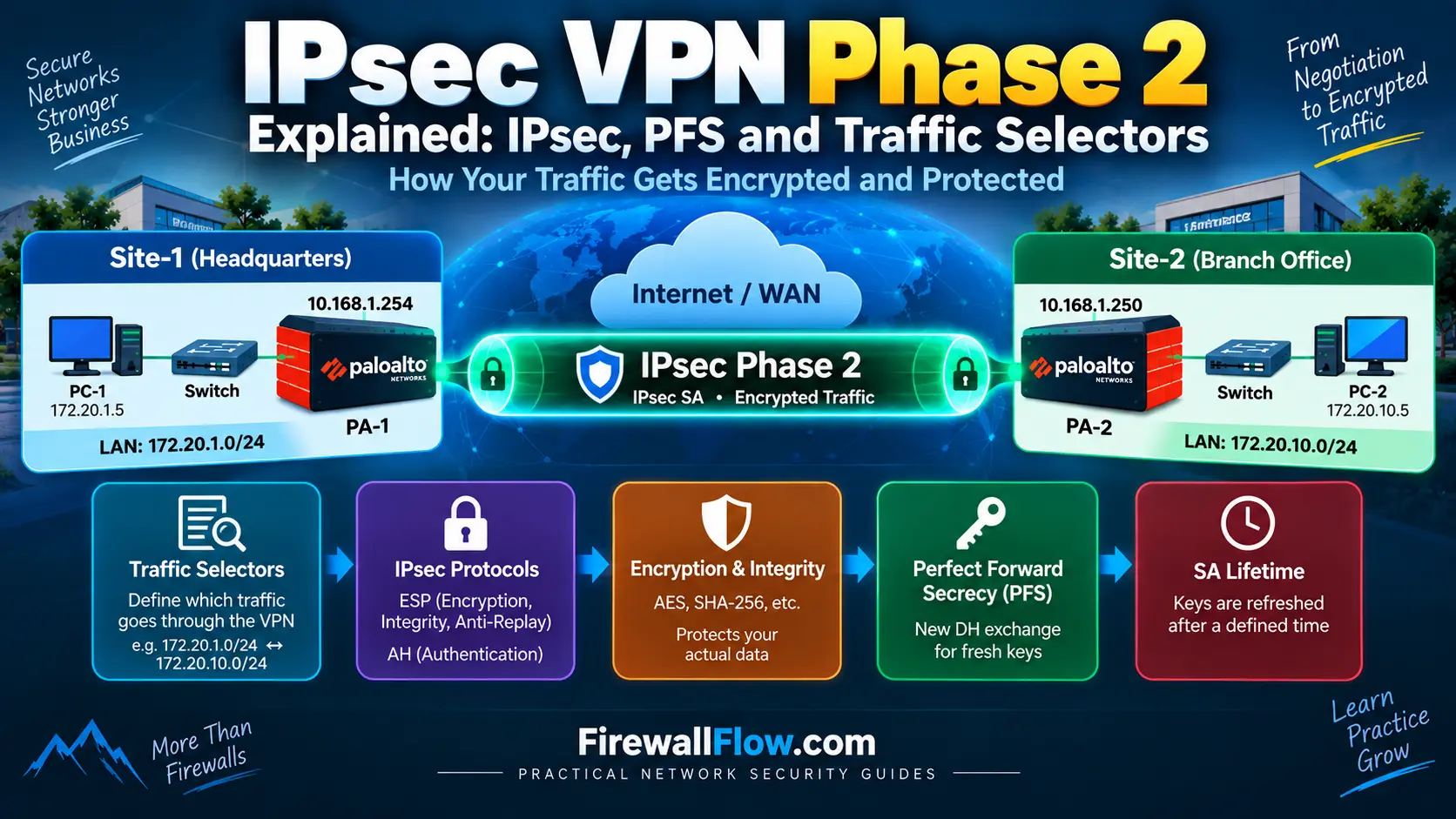
- How Phase 2 works in our lab
- Why Phase 2 can fail even when Phase 1 is working
- Common troubleshooting scenarios
- Security best practices
By the end, you should be able to understand what happens between the point where IKE Phase 1 comes up and the point where actual traffic can securely cross the VPN.
Our Site-to-Site IPsec VPN Lab
We will continue using exactly the same lab topology from the previous two articles.
Our lab contains two Palo Alto firewalls connected through a simulated Internet/WAN segment.
Site-1
- LAN:
172.20.1.0/24 - PC-1:
172.20.1.5 - Firewall LAN:
172.20.1.254 - Firewall WAN:
10.168.1.254
Site-2
- LAN:
172.20.10.0/24 - PC-2:
172.20.10.5 - Firewall LAN:
172.20.10.254 - Firewall WAN:
10.168.1.250
Our eventual goal is:
PC-1
172.20.1.5
     |
     |
172.20.1.254
     |
   PA-1
     |
10.168.1.254
     |
   WAN / Internet
     |
10.168.1.250
     |
   PA-2
     |
172.20.10.254
     |
PC-2
172.20.10.5
We want traffic between:
172.20.1.0/24
        ↕
172.20.10.0/24
to be protected by the IPsec VPN.
What Is IPsec Phase 2?
The easiest way to understand Phase 2 is to compare it with Phase 1.
Phase 1 establishes a secure relationship between the VPN peers.
Phase 2 establishes the security relationship used to protect the actual VPN traffic.
A simplified process looks like this:
        IKE Phase 1
              |
              ↓
       IKE Security SA
              |
              ↓
        IKE Phase 2
              |
              ↓
       IPsec / Child SA
              |
              ↓
       Encrypted Traffic
Palo Alto Networks describes Phase 2 as the stage where the peers further secure the channel for transferring data between the networks, using the keys established during Phase 1 and the configured IPsec cryptographic parameters.
This is why having Phase 1 up does not automatically mean that the VPN is ready to carry traffic.
Phase 2 still needs to successfully negotiate.
What Is an IPsec Security Association?
During Phase 2, the VPN peers establish an IPsec Security Association.
An SA defines how traffic will be protected.
Depending on the configuration, this includes things such as:
- Encryption algorithm
- Integrity/authentication algorithm
- IPsec protocol
- Keys
- Lifetime
- Perfect Forward Secrecy
- Traffic selectors
You can think of the SA as the security agreement that tells both firewalls:
“This is how we are going to protect the traffic belonging to this VPN.”
For our lab, the security relationship might protect traffic between:
Local network:
172.20.1.0/24

Remote network:
172.20.10.0/24
The two firewalls must agree on the relevant Phase 2 parameters.
ESP — Encapsulating Security Payload
For modern site-to-site VPNs, ESP (Encapsulating Security Payload) is the IPsec protocol you will most commonly encounter.
ESP can provide:
- Confidentiality
- Integrity
- Data-origin authentication
- Anti-replay protection
For a typical site-to-site VPN, ESP operates in tunnel mode.
Imagine PC-1 sends:
Source:      172.20.1.5
Destination: 172.20.10.5
The firewall takes the original IP packet and protects it inside the IPsec tunnel.
Conceptually:
Original packet

172.20.1.5 → 172.20.10.5

        ↓

       ESP

        ↓

Outer VPN packet

10.168.1.254 → 10.168.1.250
The outer addresses allow the packet to travel between the VPN peers, while the original private packet is protected inside the tunnel.
What About AH?
You may also hear about Authentication Header (AH).
AH provides authentication and integrity but does not provide encryption of the packet payload.
That makes it fundamentally different from ESP when confidentiality is required.
For modern site-to-site VPN deployments where data privacy is important, ESP is generally the protocol you will encounter.
For our lab, we will focus on ESP.
IPsec Encryption
One of the main purposes of the IPsec tunnel is to prevent someone monitoring the underlying network from reading the protected traffic.
For example, PC-1 sends:
172.20.1.5 → 172.20.10.5Without encryption, someone with visibility into the network path could potentially inspect the traffic.
With IPsec:
PC-1
  |
  | Original packet
  ↓
PA-1
  |
  | Encrypt
  ↓
ESP/IPsec
  |
  | Protected traffic
  ↓
PA-2
  |
  | Decrypt
  ↓
PC-2
The specific encryption algorithm is negotiated according to the IPsec cryptographic configuration.
Common examples include AES-based algorithms.
IPsec Integrity
Encryption alone is not the entire story.
The VPN also needs to detect whether protected data has been modified while travelling across the network.
Integrity mechanisms allow the receiving firewall to verify that the protected data has not been altered.
Common algorithms you may encounter include:
- SHA-256
- SHA-384
- SHA-512
The exact available options depend on the firewall platform and software version.
As with Phase 1, both VPN peers need compatible configurations.
What Is Perfect Forward Secrecy?
Perfect Forward Secrecy (PFS) is one of the most important concepts in Phase 2.
PFS is sometimes confusing because Diffie-Hellman was already discussed in Phase 1.
So why use DH again?
The answer is key independence.
With PFS enabled, a new Diffie-Hellman exchange can be performed during Phase 2 to derive fresh key material for the IPsec SA.
Conceptually:
IKE Phase 1
     |
     | DH exchange
     ↓
IKE SA keys

     ↓

IKE Phase 2
     |
     | New DH exchange
     ↓
Fresh IPsec key material
The Phase 2 key material is therefore not simply dependent on reusing the same key exchange material from Phase 1.
This provides an additional security property: compromise of certain long-term or previously used key material does not automatically expose previously protected sessions.
Palo Alto Networks documentation describes PFS as generating a new DH key during Phase 2 that is independent of the Phase 1 key exchange.
PFS and DH Groups
When PFS is enabled, you will normally select a DH group for Phase 2.
For example:
Phase 1 DH:
Group 14

Phase 2 PFS:
Group 14
The groups do not necessarily have to be identical.
For example:
Phase 1:
DH Group 14

Phase 2:
PFS Group 19
may be possible depending on platform support and configuration.
The important point is that the Phase 2 PFS configuration must be compatible between the two VPN peers.
For example:
PA-1 → PFS Group 19
PA-2 → PFS Group 14
If the peers have no compatible Phase 2 proposal, Phase 2 negotiation can fail.
What Are Traffic Selectors?
This is one of the most important parts of understanding Phase 2.
The VPN needs to know:
Which traffic should actually be protected by this tunnel?
In our lab, we want:
172.20.1.0/24
        ↕
172.20.10.0/24
So the VPN peers need to establish that this traffic belongs to the IPsec security relationship.
These definitions are commonly called traffic selectors.
A traffic selector can describe things such as:
- Source address
- Destination address
- Protocol
- Source port
- Destination port
For example:
Source:
172.20.1.0/24

Destination:
172.20.10.0/24
This tells the VPN that traffic between those networks belongs to the protected connection.
Traffic Selectors in IKEv2
IKEv2 formally uses traffic selectors when creating a Child SA.
The IETF specification defines the CREATE_CHILD_SA exchange and includes traffic selector payloads describing the traffic associated with the proposed Child SA.
This is an important distinction from simply thinking of Phase 2 as “turning on encryption.”
Phase 2 also defines what traffic the security association applies to.
Traffic Selectors in Our Lab
Let’s apply this to our topology.
PA-1
Local:
172.20.1.0/24

Remote:
172.20.10.0/24
PA-2
From PA-2’s perspective:
Local:
172.20.10.0/24

Remote:
172.20.1.0/24
Notice that the networks are reversed.
That’s expected.
The important relationship is:
PA-1:
172.20.1.0/24 → 172.20.10.0/24

PA-2:
172.20.10.0/24 → 172.20.1.0/24
The two sides must agree on the traffic being protected.
What Are Proxy IDs?
If you work with Palo Alto firewalls or third-party policy-based VPN peers, you will encounter Proxy IDs.
A Proxy ID identifies traffic that belongs to a particular IPsec VPN.
For our lab, conceptually:
Proxy ID

Local:
172.20.1.0/24

Remote:
172.20.10.0/24
On the other side:
Proxy ID

Local:
172.20.10.0/24

Remote:
172.20.1.0/24
Palo Alto Networks uses Proxy IDs to identify traffic for an IPsec VPN, particularly when interoperating with policy-based VPN peers.
There is also an important distinction between IKEv1 and IKEv2.
With IKEv1, proxy IDs generally need to match the expected traffic selectors exactly.
With IKEv2, traffic selector narrowing allows the peers to negotiate a mutually acceptable subset in some scenarios.
This distinction becomes particularly important when troubleshooting multi-vendor VPNs.
Route-Based VPN vs Policy-Based VPN
This topic is important because it explains why different firewalls may configure Phase 2 differently.
Route-Based VPN
In a route-based VPN, routing determines which traffic should enter the tunnel.
For example:
172.20.10.0/24
       ↓
Tunnel Interface
       ↓
IPsec VPN
The firewall uses a logical tunnel interface and routing information to direct traffic.
Policy-Based VPN
In a policy-based VPN, the security policy or crypto ACL defines the traffic that should be protected.
For example:
Source:
172.20.1.0/24

Destination:
172.20.10.0/24
These differences become important when two different firewall vendors are establishing an IPsec tunnel.
A route-based Palo Alto firewall may need Proxy IDs when communicating with a policy-based VPN peer.
Phase 2 Lifetime
Security associations should not remain valid indefinitely.
Phase 2 therefore has a lifetime.
After the lifetime expires, the VPN peers negotiate fresh key material and establish a new IPsec SA.
The exact lifetime depends on the firewall configuration and security policy.
For example:
IPsec SA
   |
   | Active
   |
   ↓
Lifetime expires
   |
   ↓
Rekey
   |
   ↓
New IPsec SA
This process helps ensure that cryptographic keys are periodically refreshed.
How Phase 2 Works in Our Lab
Let’s now follow the complete process.
Suppose PC-1 wants to communicate with PC-2.
PC-1
172.20.1.5
     |
     ↓
PA-1
     |
     ↓
IPsec Tunnel
     |
     ↓
PA-2
     |
     ↓
PC-2
172.20.10.5
Step 1 — Phase 1 Is Already Established
PA-1 and PA-2 have successfully established the IKE SA.
IKE SA = UPStep 2 — Phase 2 Negotiation Starts
The peers negotiate their IPsec parameters.
For example:
Encryption
Integrity
PFS
Lifetime
Step 3 — Traffic Selectors Are Negotiated
The peers establish that the relevant traffic is:
172.20.1.0/24
        ↕
172.20.10.0/24
Step 4 — IPsec SA Is Established
Once compatible parameters have been negotiated:
IPsec SA = UPStep 5 — User Traffic Can Be Protected
PC-1 can now send traffic toward PC-2.
The firewall encrypts the packet and sends it through the IPsec tunnel.
Phase 1 Up but Phase 2 Down
This is one of the most common VPN troubleshooting situations.
You might see:
IKE SA:
UP

IPsec SA:
DOWN
This tells you something very useful.
The basic IKE negotiation and authentication have succeeded.
The problem is likely further down the process.
Possible causes include:
- IPsec encryption mismatch
- Integrity mismatch
- PFS mismatch
- Traffic selector mismatch
- Proxy ID mismatch
- Phase 2 lifetime mismatch
- Unsupported proposal
- Policy-based/route-based interoperability issue
This is why knowing the difference between Phase 1 and Phase 2 is so important.
Common Phase 2 Negotiation Problems
1. Encryption Mismatch
For example:
PA-1:
AES-256

PA-2:
AES-128
If there is no compatible proposal, Phase 2 cannot establish.
2. Integrity Mismatch
For example:
PA-1:
SHA-256

PA-2:
SHA-512
If no compatible proposal exists, negotiation can fail.
3. PFS Mismatch
For example:
PA-1:
PFS Group 19

PA-2:
PFS Group 14
The peers need compatible settings.
4. Proxy ID Mismatch
This is extremely common when working with third-party VPN devices.
For example:
PA-1:

Local: 172.20.1.0/24
Remote: 172.20.10.0/24
But the remote device expects:
Local: 172.20.10.0/24
Remote: 172.20.1.0/16
The selectors do not describe the same traffic.
The result can be a Phase 2 negotiation failure.
5. Wrong Traffic Selector
Suppose the actual traffic is:
172.20.1.0/24 → 172.20.10.0/24but the VPN is configured for:
172.20.1.0/24 → 172.20.20.0/24The traffic does not match the expected protected network.
How I Would Troubleshoot Phase 2
I use a similar structured approach to Phase 1 troubleshooting.
Step 1 — Confirm Phase 1
First verify:
IKE SA = UPThere is little point troubleshooting Phase 2 if the underlying IKE relationship isn’t established.
Step 2 — Compare IPsec Proposals
Compare both sides:
- Encryption
- Integrity
- IPsec protocol
- PFS
- DH group
- Lifetime
Step 3 — Check Traffic Selectors
Verify:
Local network
Remote network
Protocol
Ports
where applicable.
Step 4 — Check Proxy IDs
If a policy-based VPN peer is involved, make sure the Proxy IDs correctly describe the protected networks.
Step 5 — Check Routing
Even if Phase 2 is established, the firewall still needs a route that sends the traffic toward the VPN tunnel.
Step 6 — Generate Traffic
For example:
PC-1:
ping 172.20.10.5
This can trigger negotiation if the tunnel is configured for on-demand establishment.
Step 7 — Check the SA
On Palo Alto, commands such as:
show vpn ike-sacan be used to inspect IKE security associations, while:
show vpn ipsec-sacan be used to inspect IPsec security associations.
Palo Alto’s troubleshooting documentation also provides commands for testing and viewing IKE and IPsec SAs.
Why Phase 2 Is More Than Just Encryption
A common misconception is:
“Phase 2 is where encryption is enabled.”
That’s only part of the story.
Phase 2 establishes several important things:
       Phase 2
          |
   ┌──────┼─────────┐
   ↓      ↓         ↓
Crypto   PFS    Traffic
Params          Selectors
   |
   ↓
IPsec SA
   |
   ↓
Protected Traffic
The VPN needs to know both:
How to protect the traffic
and
Which traffic should be protected.
That is why a VPN can have perfectly matching encryption settings and still fail because of a traffic selector or Proxy ID problem.
IPsec Phase 2 Security Best Practices
Use Strong Encryption
Use modern encryption algorithms appropriate for your environment.
Enable PFS Where Appropriate
PFS provides fresh key material during Phase 2 and can provide additional security.
Keep Traffic Selectors Specific
Don’t define extremely broad selectors when only a small number of networks actually need VPN access.
For example, if you only need:
172.20.1.0/24
        ↕
172.20.10.0/24
there is usually no reason to define the entire private address space.
Keep Both Peers Consistent
Document the Phase 2 configuration on both sides.
A simple VPN matrix can help:
| Parameter | PA-1 | PA-2 |
|---|---|---|
| Encryption | AES-256 | AES-256 |
| Integrity | SHA-256 | SHA-256 |
| PFS | Group 19 | Group 19 |
| Local Network | 172.20.1.0/24 | 172.20.10.0/24 |
| Remote Network | 172.20.10.0/24 | 172.20.1.0/24 |
This makes mismatches much easier to identify.
Phase 1 vs Phase 2
At this point, the difference should be clear.
| IKE Phase 1 | IKE Phase 2 |
|---|---|
| Establishes IKE SA | Establishes IPsec/Child SA |
| Authenticates VPN peers | Establishes protection for data traffic |
| Negotiates IKE parameters | Negotiates IPsec parameters |
| Uses DH for key exchange | May use PFS/DH for fresh key material |
| Creates secure control relationship | Protects user traffic |
| Establishes foundation | Establishes data-plane security |
A simple interview-friendly explanation is:
Phase 1 establishes a secure and authenticated relationship between the VPN peers. Phase 2 uses that relationship to negotiate the IPsec security parameters and establish the SA that protects the actual VPN traffic.
A Simple Mental Model
If you want to remember the entire process, think about it like this:
             VPN Establishment

                  IKE
                   |
                   ↓
             Phase 1
                   |
          Authenticate peers
                   |
              IKE SA
                   |
                   ↓
             Phase 2
                   |
       ┌───────────┼───────────┐
       ↓           ↓           ↓
    IPsec       PFS/DH     Traffic
   Proposal                Selectors
       |           |           |
       └───────────┼───────────┘
                   ↓
                IPsec SA
                   |
                   ↓
            Encrypted Traffic
This model is useful both when learning IPsec and when troubleshooting a production VPN.
Common Mistakes When Learning Phase 2
Mistake 1 — Assuming Phase 1 and Phase 2 Are the Same
They have different responsibilities.
Mistake 2 — Thinking PFS Is Required to Make Encryption Work
PFS is an additional key-management security feature. Whether it is enabled depends on the security requirements and peer compatibility.
Mistake 3 — Ignoring Traffic Selectors
Correct encryption settings don’t help if the traffic being sent doesn’t match the negotiated selectors.
Mistake 4 — Forgetting the Direction of the Networks
The local and remote networks are reversed when viewed from the opposite VPN peer.
Mistake 5 — Assuming an Up IPsec SA Means Applications Will Work
Routing, NAT, security policy, host firewalls, and application requirements can still prevent communication.
What We Have Learned
In this article, we moved from IKE Phase 1 into the next stage of the VPN establishment process.
The important points are:
- Phase 2 establishes the IPsec/Child Security Association.
- ESP is the primary IPsec protocol we focus on for modern site-to-site VPNs.
- IPsec provides confidentiality and integrity mechanisms.
- PFS can generate fresh key material for Phase 2.
- Traffic selectors define the traffic associated with the Child SA.
- Proxy IDs are particularly important when interoperating with policy-based VPN peers.
- Phase 1 can be UP while Phase 2 remains DOWN.
- Encryption, integrity, PFS, lifetimes, and traffic selectors must be compatible.
- A successful Phase 2 negotiation still does not guarantee that application traffic will work.
What’s Next?
So far, we have covered:
Part 1: What a site-to-site IPsec VPN is and how it works.
Part 2: How IKE Phase 1 establishes the secure relationship between VPN peers.
Part 3: How Phase 2 establishes the IPsec security relationship that protects the actual traffic.
But there is still another important piece.
Even when:
IKE SA       → UP
IPsec SA     → UP
traffic can still fail.
Why?
Because the firewall still has to make decisions about routing, NAT, and security policy.
That’s what we will investigate in Part 4:
IPsec VPN Routing, NAT and Security Policies Explained
We will follow the packet from:
PC-1
172.20.1.5
to:
PC-2
172.20.10.5
and examine exactly what happens at each stage of the firewall’s packet-processing path.
That article will bridge the gap between “the VPN tunnel is UP” and “the application actually works.”
Frequently Asked Questions
What is IPsec Phase 2?
IPsec Phase 2 is the stage where the VPN peers negotiate the security parameters and establish the IPsec Security Association used to protect network traffic.
What is a Child SA?
In IKEv2, a Child SA represents the security association used for IPsec-protected traffic. The terminology is more precise than simply calling it “Phase 2,” although Phase 2 remains common operational terminology.
What is PFS in IPsec VPN?
Perfect Forward Secrecy allows the VPN peers to perform a fresh Diffie-Hellman exchange for new key material, providing additional separation between Phase 2 keys and previously established key material.
What are traffic selectors?
Traffic selectors define which traffic belongs to an IPsec/Child SA. They can include source and destination addresses and, depending on the configuration, protocol and port information.
What is a Proxy ID?
A Proxy ID identifies the traffic that belongs to an IPsec VPN. It is particularly important when a Palo Alto firewall interoperates with a policy-based VPN peer.
Can Phase 1 be UP while Phase 2 is DOWN?
Yes. Phase 1 and Phase 2 have separate negotiations and security parameters. A Phase 2 proposal, PFS, traffic selector, or Proxy ID mismatch can prevent Phase 2 from establishing even when Phase 1 is already successful.
Does Phase 2 automatically make all traffic go through the VPN?
No. Routing and other firewall processing still determine whether traffic reaches the VPN tunnel. NAT and security policy can also affect whether the traffic successfully crosses the VPN.
Conclusion
IPsec Phase 2 is where the VPN moves from establishing trust to protecting actual network traffic.
The two firewalls negotiate IPsec parameters, establish their Security Association, determine which traffic belongs to the VPN, and potentially perform a fresh Diffie-Hellman exchange when PFS is enabled.
For our lab, that ultimately means protecting traffic between:
172.20.1.0/24
        ↕
172.20.10.0/24
through the two Palo Alto firewalls.
Understanding Phase 2 is especially important when troubleshooting VPNs because Phase 1 being UP does not necessarily mean the IPsec tunnel is ready to carry traffic.
Once Phase 1 and Phase 2 are understood, the next challenge is following the actual packet.
That’s where routing, NAT, and security policies become critical—and that’s the focus of the next article in this series.

Cybersecurity blogger with a focus on firewalls, network security, and tech trends making security simple for everyone, from IT pros to curious minds.