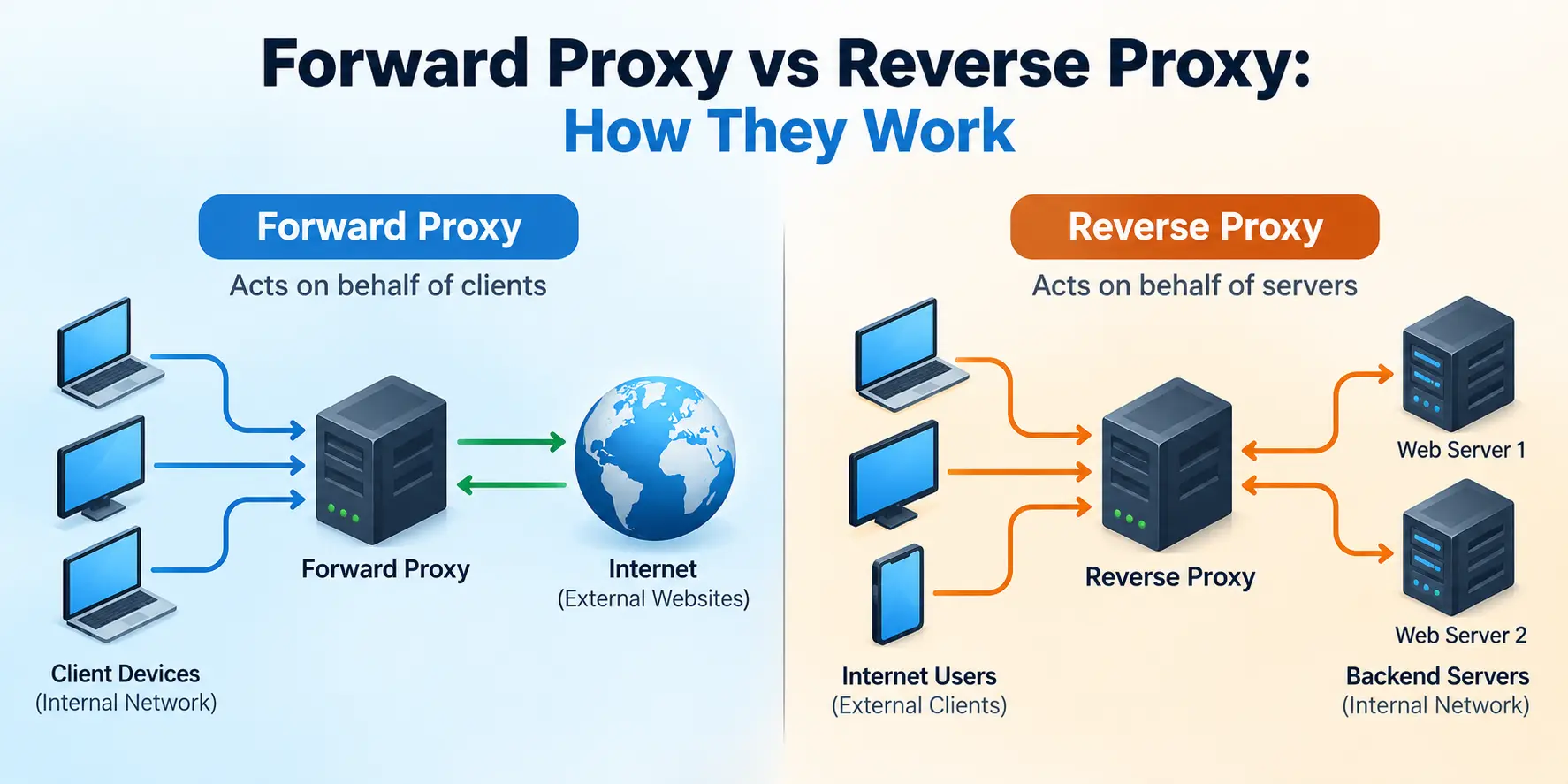
You may have heard the terms forward proxy and reverse proxy while working with firewalls, web servers, or enterprise networks. Both sit between two endpoints and forward traffic, but they solve different problems.
A forward proxy is used when clients need to access external resources through an intermediary. A reverse proxy is used when external clients need to access applications or web servers through an intermediary.
The difference becomes easier to understand when you follow the traffic.
Let’s look at how each proxy works, where it fits into a network, and why you would use one instead of the other.
What Is a Proxy Server?
A proxy server acts as an intermediary between a client and a destination server. Instead of communicating directly with the destination, the client sends its request through the proxy.
The proxy receives the request, forwards it when permitted, and relays the response.
The key question is: whose traffic is the proxy handling?
- A forward proxy acts on behalf of clients.
- A reverse proxy acts on behalf of servers.
Both can provide traffic control and security features, but their placement and purpose are different. Cloudflare’s proxy explanation provides a useful overview of this distinction.
What Is a Forward Proxy?
A forward proxy sits between client devices and external networks, usually the internet. Internal clients send their requests through the proxy, which communicates with the destination server on their behalf.
Forward proxies are commonly used in corporate networks to control outbound web access.
For example, imagine a company network with 200 employees. The company wants to block access to certain websites, apply browsing policies, and maintain logs of internet activity.
Instead of allowing every computer to access the internet directly, the company can configure a forward proxy and direct supported traffic through it.
The proxy can apply access policies before forwarding requests to external destinations.
How Does a Forward Proxy Work?
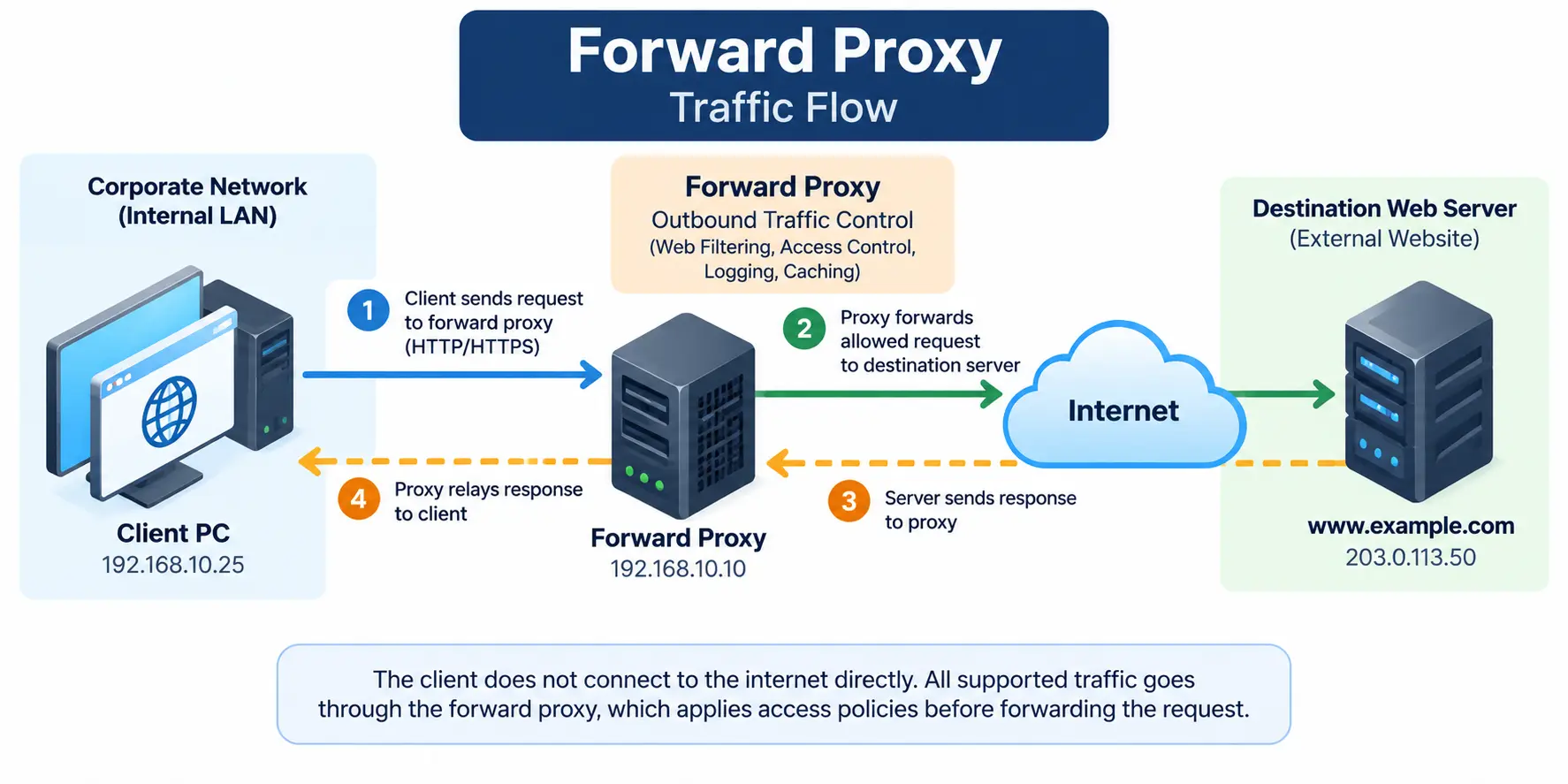
Consider this simple network:
- Client PC:
192.168.10.25 - Forward proxy:
192.168.10.10 - Destination website:
203.0.113.50
The IP addresses are examples for illustrating the traffic flow.
The request follows this path:
- The user opens a website from the client PC.
- The browser sends its request to the configured forward proxy.
- The proxy checks the request against its access policies.
- If the request is allowed, the proxy forwards it to the destination website.
- The website sends its response back to the proxy.
- The proxy relays the response to the client.
The client receives the website’s content without needing to establish a direct connection to the destination through the normal application request path.
A forward proxy can control outbound web access, but it does not replace a VPN. To understand the difference, read our guide on how a VPN protects your internet traffic.
What Is a Forward Proxy Used For?
Common use cases include:
- Web filtering: Block access to websites that violate company policies.
- Access control: Allow or deny requests based on users, groups, or other configured rules.
- Logging and monitoring: Record supported web requests for troubleshooting, reporting, or security investigations.
- Caching: Store eligible content so repeated requests may be served without fetching it again.
- Controlled internet access: Require supported client traffic to pass through a central point.
A forward proxy can also hide a client’s original public source IP address from the destination website. However, this depends on the proxy configuration and the protocol being used.
One important point: a forward proxy does not automatically inspect the contents of every HTTPS connection. Inspecting encrypted traffic requires appropriate TLS inspection capabilities and configuration. Without that, the proxy may only see connection details or tunnel metadata.
What Is a Reverse Proxy?
A reverse proxy sits in front of one or more web servers or application servers. It accepts incoming client requests and forwards them to the appropriate backend server.
From the client’s perspective, it appears to be communicating with the website or application endpoint. The reverse proxy handles the connection to the backend.
Let’s take a website hosted on two web servers. Both servers run the same application, but you want users to access the website through a single public endpoint.
You can deploy a reverse proxy in front of those servers. The reverse proxy receives incoming requests and forwards them to an appropriate backend based on its configuration.
This is also why reverse proxies are commonly used for load balancing, TLS termination, caching, and application-layer security. NGINX documents these request-forwarding capabilities in its reverse proxy guide.
Before troubleshooting a website that does not load, check whether its hostname resolves to the expected endpoint using our DNS Lookup Tool.
How Does a Reverse Proxy Work?
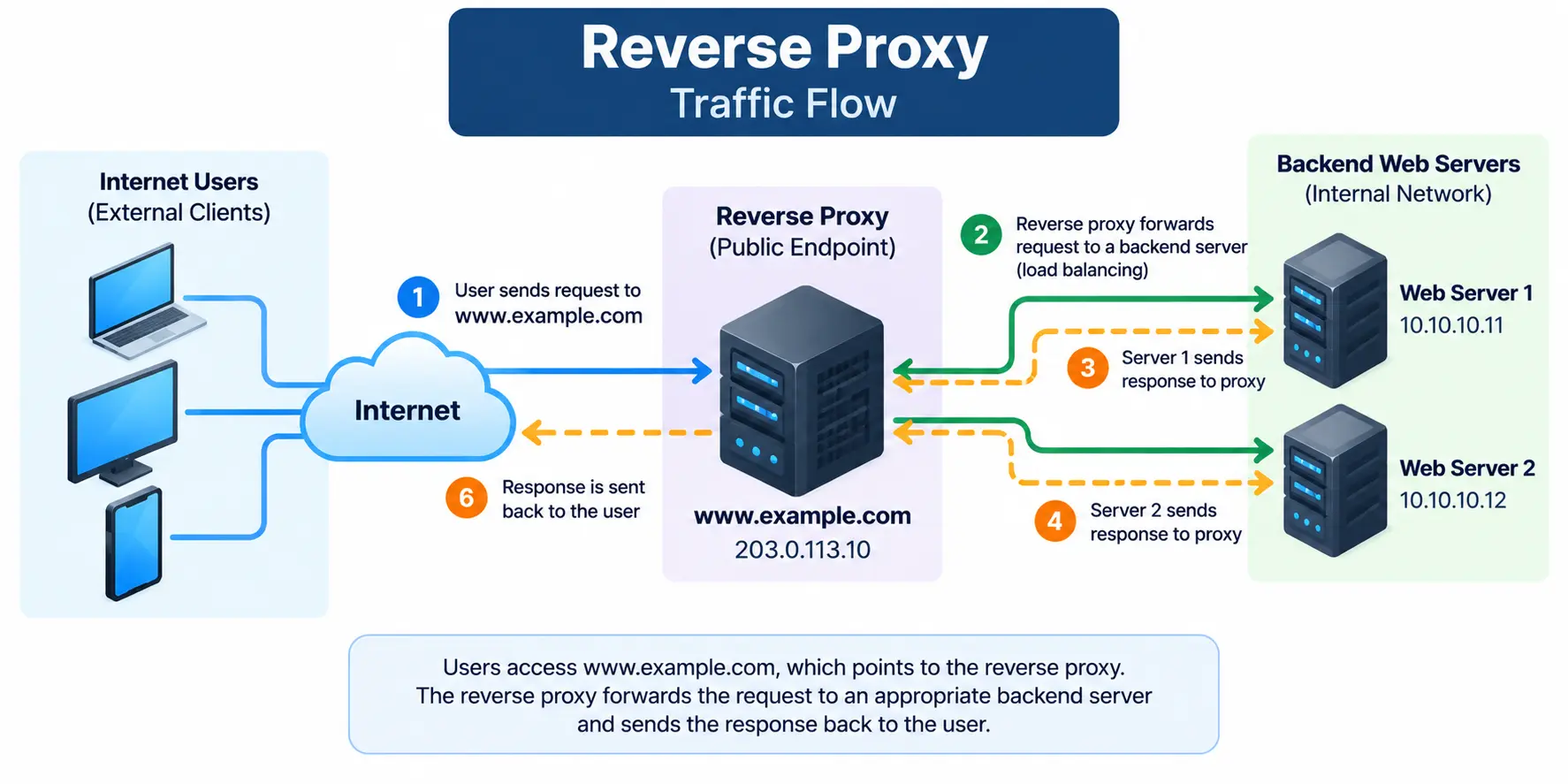
Consider this example:
- Public website:
www.example.com - Reverse proxy:
203.0.113.10 - Web server 1:
10.10.10.11 - Web server 2:
10.10.10.12
The addresses are illustrative examples.
The request follows this path:
- A user opens
www.example.com. - The user’s browser connects to the public endpoint handled by the reverse proxy.
- The reverse proxy evaluates the request and selects a backend according to its configuration.
- The selected web server processes the request.
- The backend returns its response to the reverse proxy.
- The reverse proxy sends the response back to the user.
The client does not need to know which backend server handled the request.
What Is a Reverse Proxy Used For?
Reverse proxies are useful when publishing and managing applications.
- Load balancing: Distribute requests across multiple backend servers.
- TLS termination: Handle HTTPS encryption at the proxy and forward requests to backends using the configured protocol.
- Origin protection: Keep backend servers off the public internet where the architecture allows it.
- Caching: Serve eligible responses from a cache to reduce backend workload.
- Application security: Integrate controls such as a web application firewall (WAF).
- Centralized routing: Send requests to different applications based on hostnames, paths, or other configured attributes.
A reverse proxy does not automatically make a website secure. The backend servers still need appropriate security controls, and the origin should be protected against direct access when the design depends on traffic passing through the proxy.
Also, TLS termination does not necessarily mean the connection to the backend is unencrypted. The proxy can establish a separate HTTPS connection to the backend when configured to do so.
Forward Proxy vs Reverse Proxy: Key Differences
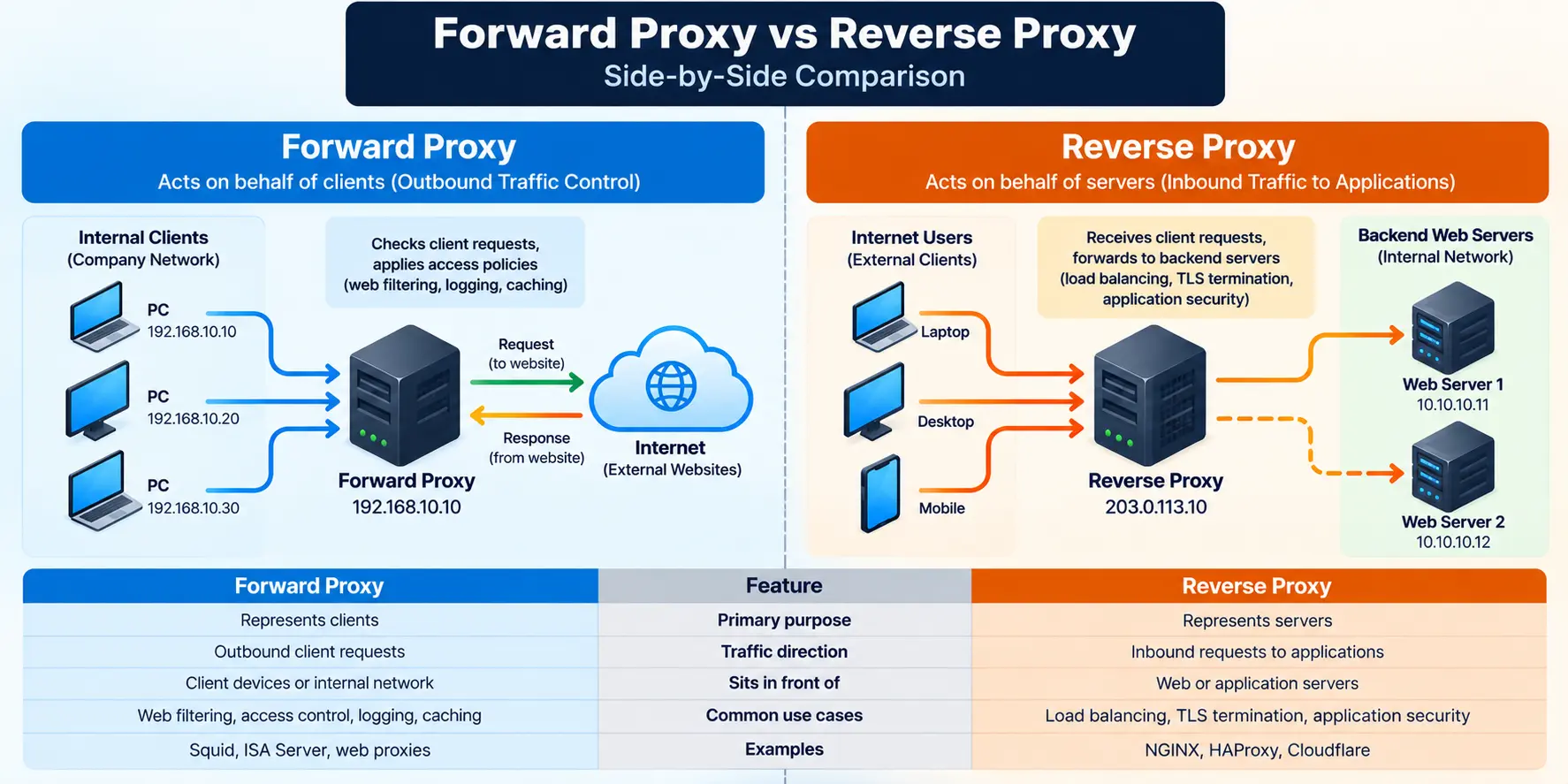
Both proxy types forward traffic, but their roles are different.
| Feature | Forward Proxy | Reverse Proxy |
|---|---|---|
| Primary purpose | Represents clients | Represents servers |
| Typical traffic direction | Outbound client requests | Inbound requests to applications |
| Sits in front of | Client devices or networks | Web or application servers |
| Main use cases | Web filtering, access control, outbound monitoring | Load balancing, TLS termination, application security |
| Common examples | Squid, enterprise web proxies | NGINX, HAProxy, Cloudflare |
| Who typically configures it? | Network or security team | Application, infrastructure, or security team |
These are common deployment patterns, not strict limitations. For example, NGINX and other proxy platforms can support different proxy roles depending on their capabilities and configuration.
Can You Use a Forward Proxy and Reverse Proxy Together?
Yes. An enterprise network can use both at the same time because they handle different parts of the traffic flow.
Imagine an employee accessing an external application hosted by a company that uses a reverse proxy.
The employee’s organization may first send the request through its forward proxy. That proxy applies the organization’s outbound access policies and forwards the request towards the destination.
At the destination, the reverse proxy receives the incoming request and forwards it to the appropriate application server.
The simplified flow looks like this:
Employee PC → Corporate Forward Proxy → Internet → Reverse Proxy → Application Server
The response travels back through the corresponding connections.
Each proxy has a separate responsibility: the forward proxy manages the client’s outbound access, while the reverse proxy manages how the destination application receives requests.
What Should You Check When Troubleshooting Proxy Issues?
When an application fails to connect, first identify which proxy is involved. The troubleshooting approach depends on where the traffic is being handled.
For a forward proxy, check:
- Is the client configured to use the correct proxy address and port?
- Can the client reach the proxy?
- Is proxy authentication required?
- Is the destination allowed by the access policy?
- Are firewall rules permitting the required connections?
- Is HTTPS traffic failing because of TLS inspection or certificate trust issues?
For a reverse proxy, check:
- Does the public hostname resolve to the correct endpoint?
- Can the client establish a connection to the reverse proxy?
- Is the TLS certificate valid for the requested hostname?
- Does the proxy route the request to the correct backend?
- Can the proxy reach the backend server on the required port?
- Are backend health checks, application logs, and proxy logs showing errors?
A reverse proxy can accept a client connection successfully while still failing to reach the backend. That is why checking only the public endpoint is not enough.
Similarly, a forward proxy may be reachable while denying a particular destination because of an access policy.
Follow the request through each connection instead of assuming that a reachable proxy means the entire application path is working.
Final Thoughts
The easiest way to remember the difference is to look at which side the proxy represents.
A forward proxy represents clients and controls how they access external resources. A reverse proxy represents servers and manages how external clients reach applications.
Once you understand that distinction, it becomes much easier to identify where each proxy belongs in a network, what problems it solves, and where to start troubleshooting when traffic fails.

Cybersecurity blogger with a focus on firewalls, network security, and tech trends making security simple for everyone, from IT pros to curious minds.