You connect a laptop to a switch, open a website, or access a server on your local network. A lot happens before the actual data reaches its destination.
One of the most important pieces involved in local Ethernet communication is the MAC address.
You have probably seen a MAC address before. It looks something like:
00:1A:2B:3C:4D:5E
But what exactly is it used for? How does a switch learn it? And if devices already have IP addresses, why do we need MAC addresses at all?
Let’s break it down from the way a network engineer would actually look at it.
What Is a MAC Address?
MAC stands for Media Access Control. A MAC address is a Layer 2 address used to identify a network interface on an Ethernet or Wi-Fi network.
For a typical Ethernet interface, the address is 48 bits long and is normally written as six hexadecimal pairs.
For example:
00:1A:2B:3C:4D:5EYou may also see the same address written in other formats:
00-1A-2B-3C-4D-5Eor on Cisco devices:
001A.2B3C.4D5EThe IEEE Registration Authority manages address blocks used for IEEE networking technologies such as Ethernet and Wi-Fi. A 48-bit universally unique address is formally referred to as an EUI-48.
A simple way to think about it is:
IP address tells the network where the device is logically located.
MAC address identifies the Layer 2 interface used for local delivery.
That difference becomes much clearer when we look at what a switch actually does.
The IEEE Registration Authority manages MAC address blocks used with networking technologies such as Ethernet and Wi-Fi. IEEE MAC Addresses
What Does a MAC Address Look Like?
A MAC address contains 48 bits, which is 6 bytes or 12 hexadecimal characters.
For example:
3C:52:82:10:AB:45The first part of the address is associated with an IEEE-assigned identifier, commonly referred to as an OUI (Organizationally Unique Identifier) in networking discussions. The remaining portion is used by the organization to create individual addresses within its assigned block. IEEE now uses terms such as MA-L and EUI-48 in its registration system.
One thing to remember is that you should not assume every modern MAC address behaves like a permanently burned-in hardware identifier. Devices and operating systems can use locally administered or randomized MAC addresses.
This is especially common with modern Wi-Fi devices.
So, when troubleshooting, look at the MAC address the device is actually using rather than assuming it can never change.
Why Do We Need MAC Addresses If We Already Have IP Addresses?
This is where networking starts to make more sense.
Suppose your PC has:
IP address: 192.168.10.10
MAC address: 3C:52:82:10:AB:45
Another PC has:
IP address: 192.168.10.20
MAC address: 84:7B:EB:22:11:90
The IP addresses are used at Layer 3.
But when these two devices communicate on the same Ethernet network, the actual Ethernet frame needs a destination MAC address.
For example:
Source MAC:      3C:52:82:10:AB:45
Destination MAC: 84:7B:EB:22:11:90
The switch uses that destination MAC to decide where to send the frame.
The switch is not looking at the destination IP address to make a normal Layer 2 forwarding decision.
That’s the job of the MAC address table.
How a Switch Learns MAC Addresses
This is probably the most important part of understanding MAC addresses.
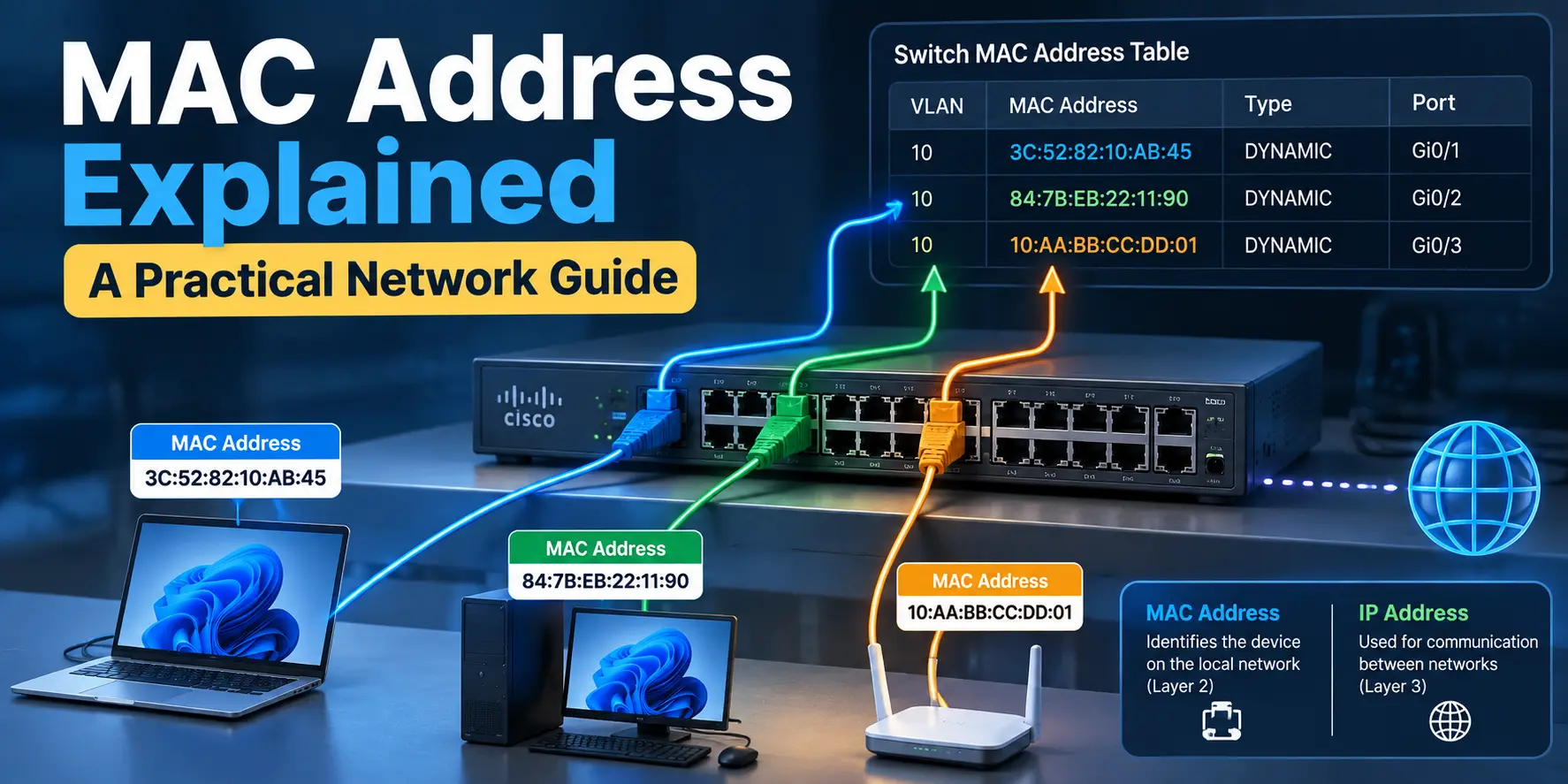
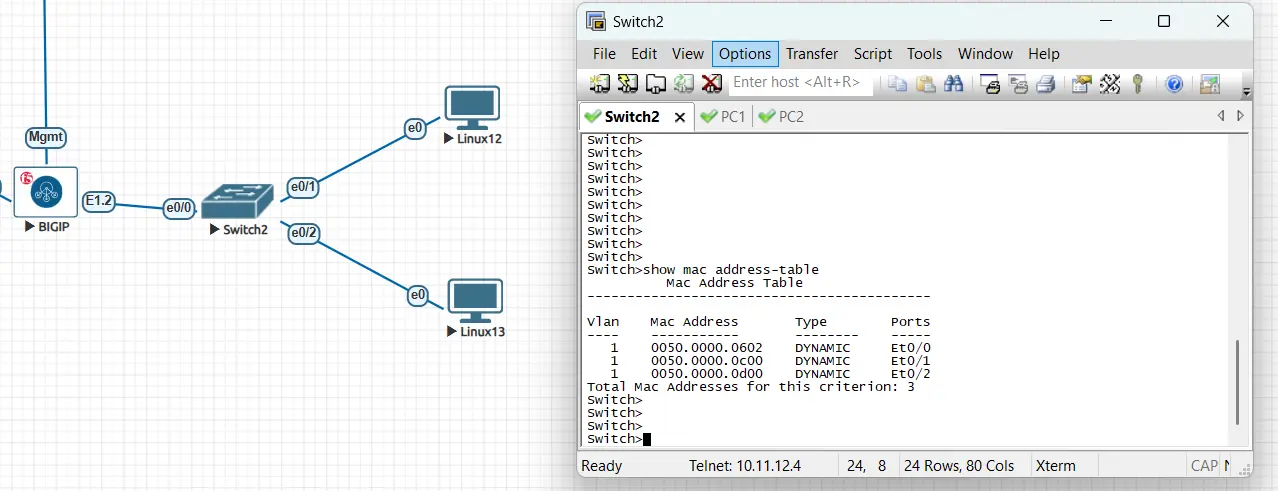
A Layer 2 switch maintains a MAC address table, also commonly called a CAM table. The table maps a MAC address to the switch port through which that MAC was learned.
For example:
| MAC Address | Port |
|---|---|
| 3C:52:82:10:AB:45 | Gi0/1 |
| 84:7B:EB:22:11:90 | Gi0/2 |
| 10:AA:BB:CC:DD:01 | Gi0/3 |
But how does the switch build this table?
It learns from the source MAC address of incoming Ethernet frames.
Imagine PC-A is connected to Gi0/1.
PC-A sends a frame:
Source MAC:      3C:52:82:10:AB:45
Destination MAC: 84:7B:EB:22:11:90
The frame enters the switch through Gi0/1.
The switch sees:
“I received a frame from 3C:52:82:10:AB:45 on Gi0/1.”
It then adds the mapping:
3C:52:82:10:AB:45 → Gi0/1The switch has now learned where that MAC address is located.
This happens automatically as traffic passes through the switch. Cisco’s documentation and community explanations describe the same basic behavior: the switch learns the source MAC on the ingress interface and uses its MAC table to make the forwarding decision for the destination MAC.
What Happens When the Switch Knows the Destination MAC?
Let’s continue with the same example.
Suppose the switch already knows:
3C:52:82:10:AB:45 → Gi0/1
84:7B:EB:22:11:90 → Gi0/2
PC-A sends a frame to PC-B.
The switch receives the frame on Gi0/1 and checks the destination MAC:
Destination MAC:
84:7B:EB:22:11:90
The switch searches its MAC address table.
It finds:
84:7B:EB:22:11:90 → Gi0/2So the switch sends the frame only through Gi0/2.
It does not need to send the frame out every port.
That’s one of the main reasons a switch is much more efficient than an old-style hub.
What If the Switch Doesn’t Know the Destination MAC?
Now let’s change the situation.
The switch receives a frame destined for:
AA:BB:CC:11:22:33But that MAC address isn’t currently in its table.
What does the switch do?
It floods the frame within the relevant VLAN, sending it out the other forwarding ports rather than the port where the frame arrived.
This is called unknown unicast flooding.
Once the destination device responds and the switch sees its source MAC, the switch can learn the destination’s location.
So the process is basically:
Frame arrives
     ↓
Learn source MAC
     ↓
Check destination MAC
     ↓
Is destination known?
     ↓
Yes → Forward to specific port
No  → Flood within VLAN
Broadcast traffic is also flooded within the VLAN. The Ethernet broadcast MAC address is:
FF:FF:FF:FF:FF:FFThis is why VLANs matter so much in switched networks. A broadcast or unknown-unicast flood is contained within the applicable Layer 2 domain rather than being sent across routed boundaries.
MAC Address and ARP: How Do Devices Find Each Other?
There is another important piece here.
A device may know the destination IP address, but it still needs the destination MAC address when the destination is on the same local subnet.
This is where ARP (Address Resolution Protocol) comes in for IPv4.
Suppose:
PC-A
IP: 192.168.10.10

PC-B
IP: 192.168.10.20
PC-A wants to send traffic to 192.168.10.20, but it doesn’t know PC-B’s MAC address.
PC-A sends an ARP request asking:
Who has 192.168.10.20?
The ARP request is sent as a broadcast, so the Ethernet destination MAC is:
FF:FF:FF:FF:FF:FFPC-B receives the request and replies with its MAC address.
PC-A can then use that MAC address when creating the Ethernet frames for local communication.
So you can think of ARP as helping answer:
I know the IP address.
What MAC address should I use to reach it?
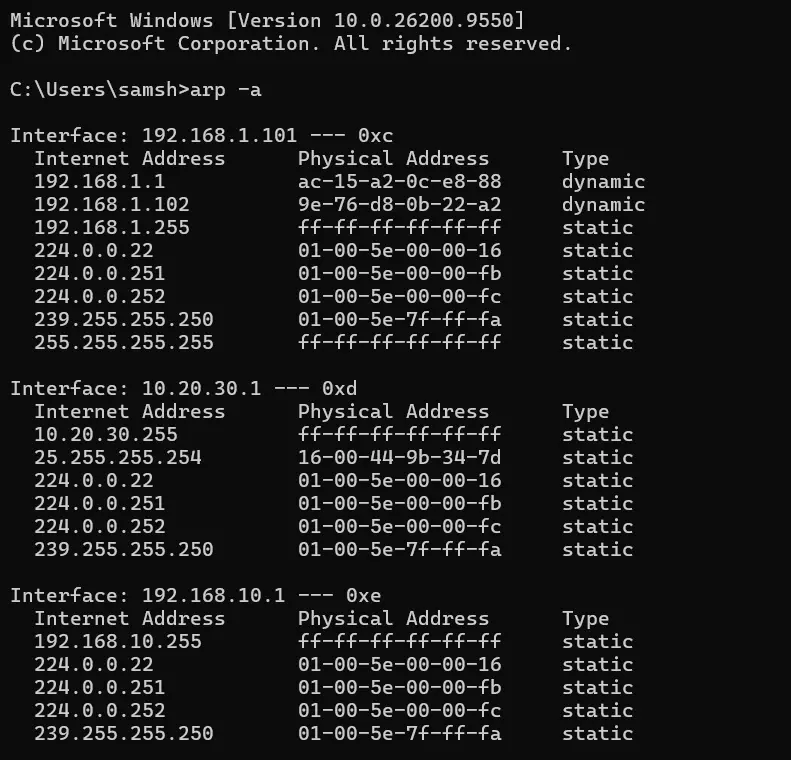
The resulting IP-to-MAC information is temporarily stored in the ARP cache.
What Happens When the Destination Is on Another Network?
This is an important distinction.
Suppose your PC is:
IP: 192.168.10.10and you want to reach:
8.8.8.8The destination is not on your local subnet.
Your PC does not try to find the MAC address of 8.8.8.8.
Instead, it sends the frame toward its default gateway.
For example:
Source IP:      192.168.10.10
Destination IP: 8.8.8.8

Source MAC:      PC MAC
Destination MAC: Default Gateway MAC
The router or firewall then processes the Layer 3 packet and forwards it toward the next network.
This is a key difference between Layer 2 and Layer 3 communication.
MAC addresses are used for local Ethernet delivery. IP addresses are used for Layer 3 communication between networks.
MAC Address Table Across Multiple Switches
Here’s another situation that often confuses people.
Imagine:
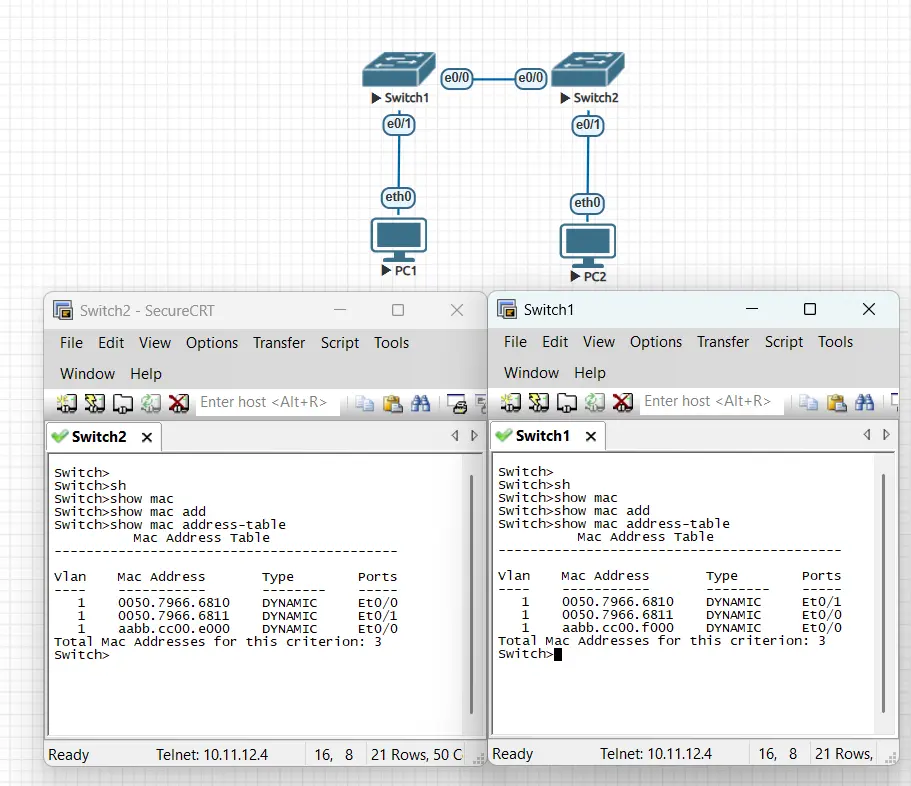
PC-1 ---- SW1 ---- SW2 ---- PC-2PC-1 is directly connected to SW1.
PC-2 is directly connected to SW2.
SW1 will learn PC-1’s MAC on the port connected to PC-1.
But SW1 will also eventually learn PC-2’s MAC — on the link toward SW2.
It doesn’t learn PC-2 on a nonexistent direct port. It learns the MAC on the interface where frames from PC-2 arrive.
SW2 does the opposite.
It learns PC-2 on its local access port and PC-1 on the uplink toward SW1.
This becomes extremely useful when troubleshooting a network.
How to Find a MAC Address
You can find the MAC address from the operating system, switch, router, firewall, or wireless controller depending on where the device is connected.
On Windows, one of the easiest methods is:
ipconfig /allLook for the Physical Address under the relevant network adapter. Microsoft documents ipconfig /all as the command for displaying the full TCP/IP configuration for the system’s adapters.
On Linux, you can use:
ip link showOn a Cisco switch, a commonly used command is:
show mac address-tableYou can also filter the output when troubleshooting a specific MAC or VLAN.
Can a MAC Address Change?
Yes.
This is another common misconception.
A MAC address may be associated with a network interface, but it isn’t necessarily permanent from the network’s point of view.
Operating systems can use software-defined or locally administered MAC addresses. Wi-Fi devices may also use MAC address randomization for privacy.
This means you should not treat a MAC address as an unchangeable identity.
In a controlled enterprise network, however, the MAC address currently seen by the switch can still be very useful for identifying where a device is connected and troubleshooting Layer 2 connectivity.
MAC Address Spoofing
Because MAC addresses can be changed in software, an attacker can potentially configure a device to use another MAC address.
This is called MAC spoofing.
For example, if a network uses MAC-based filtering, simply copying an allowed MAC address may allow another device to appear as that device at Layer 2.
This is one reason MAC filtering should not be treated as strong security by itself.
Network security controls such as 802.1X, NAC, switch port security, authentication, and proper segmentation can provide stronger controls depending on the environment.
MAC Address vs IP Address
The easiest way to remember the difference is:
| MAC Address | IP Address |
|---|---|
| Layer 2 | Layer 3 |
| Used for local network delivery | Used for communication between networks |
| Used by switches | Used by routers and Layer 3 devices |
| Typically 48 bits for Ethernet/Wi-Fi | IPv4 is 32 bits, IPv6 is 128 bits |
| Written in hexadecimal | IPv4 written in dotted decimal |
| Used in Ethernet frames | Used in IP packets |
Neither address replaces the other.
They work together.
When a device communicates on a local Ethernet network, the IP address identifies the Layer 3 destination while the MAC address is used for the local Layer 2 delivery.
Troubleshooting MAC Address Problems
When troubleshooting a Layer 2 problem, don’t immediately start changing switch configurations.
First, check what the network is actually seeing.
For example:
1. Is the interface up?
2. Is the device connected to the expected switch port?
3. Does the switch have a MAC entry for the device?
4. Is the MAC learned in the correct VLAN?
5. Is the MAC appearing on the expected interface?
6. Is the MAC moving between ports?
7. Is the device actually sending traffic?
8. Is there a VLAN or trunking issue?
On a Cisco switch, start with:
show mac address-tableThen narrow the investigation to the relevant VLAN or interface.
If the MAC address keeps moving between two interfaces, you may have a Layer 2 loop, incorrect cabling, bridging behavior, or another topology problem. This is commonly referred to as MAC flapping.
The important part is not just finding the MAC address.
You want to understand why the switch learned that MAC on that particular port.
Final Thoughts
A MAC address may look like nothing more than a string of hexadecimal characters, but it is one of the basic building blocks of Ethernet networking.
Once you understand how a switch learns source MAC addresses, builds its MAC address table, and uses the destination MAC to forward frames, many Layer 2 concepts become easier to understand.
ARP makes the connection between IP addresses and MAC addresses on IPv4 local networks. Switches use MAC learning to determine where devices are located. VLANs control where Layer 2 traffic can travel.
And when something goes wrong, the MAC address table gives you one of the first places to look.
Instead of guessing which port a device is connected to, you can ask the switch what it actually learned.
That is where MAC addresses become much more useful than just another networking term.

Cybersecurity blogger with a focus on firewalls, network security, and tech trends making security simple for everyone, from IT pros to curious minds.